Synology Video Tutorial Site
Video Library Webpage Redesign
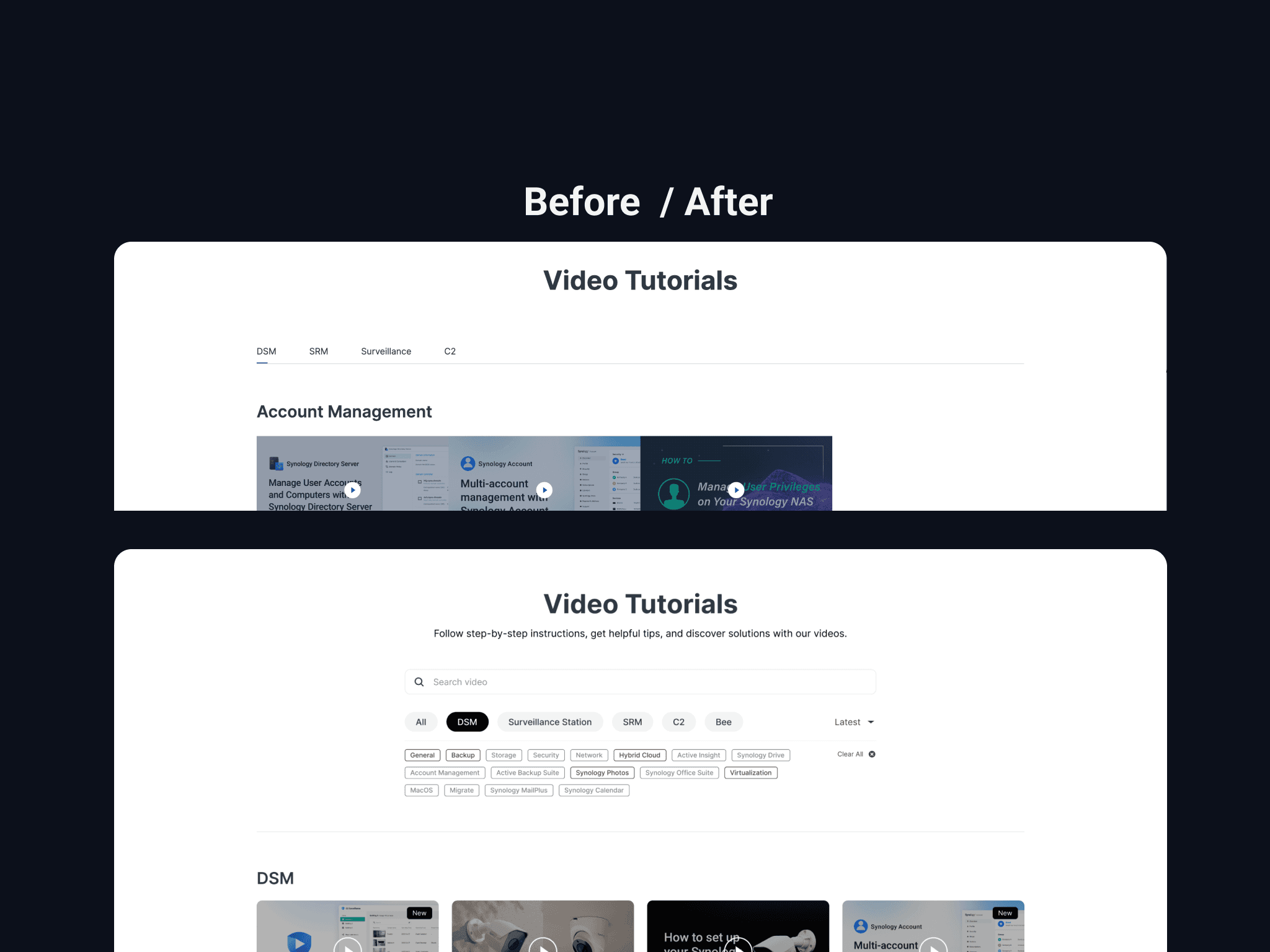
As a UX designer and project manager, I led the redesign of Synology’s Official Video Tutorial Page to improve content discoverability. After identifying usability pain points through user research, I implemented a search bar and filtering tools with cross-functional teams. Since its launch on December 17, 2024, GA4 data shows a 130x boost in organic traffic driven by design improvements.
As a UX designer and project manager, I led the redesign of Synology’s Official Video Tutorial Page to improve content discoverability. After identifying usability pain points through user research, I implemented a search bar and filtering tools with cross-functional teams. Since its launch on December 17, 2024, GA4 data shows a 130x boost in organic traffic driven by design improvements.
Client / Industry
Synology / Software
Linda's Role
UX & Project Manager
Skills
UX design, Wireframing, Prototyping, Information Architecture, Project Management
Date
2024 full year
01 Project Background
01 Project Background
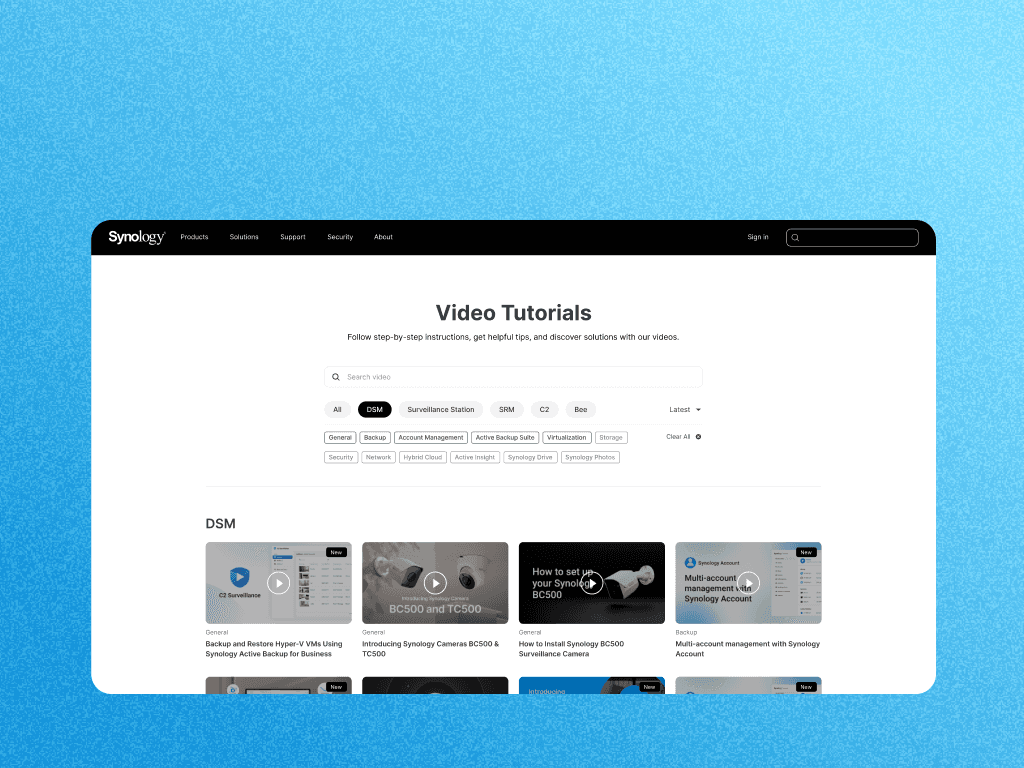
The original Synology video tutorial page had remained unchanged for years and was buried within the site’s dropdown menu. As the video library expanded, the outdated four-tab structure no longer supported efficient navigation. The absence of a search bar and filtering tools further degraded usability. Representing the Design Team, I initiated and led a cross-functional project with eight MIS engineers (frontend and backend) and one visual designer to revamp the page.
The original Synology video tutorial page had remained unchanged for years and was buried within the site’s dropdown menu. As the video library expanded, the outdated four-tab structure no longer supported efficient navigation. The absence of a search bar and filtering tools further degraded usability. Representing the Design Team, I initiated and led a cross-functional project with eight MIS engineers (frontend and backend) and one visual designer to revamp the page.
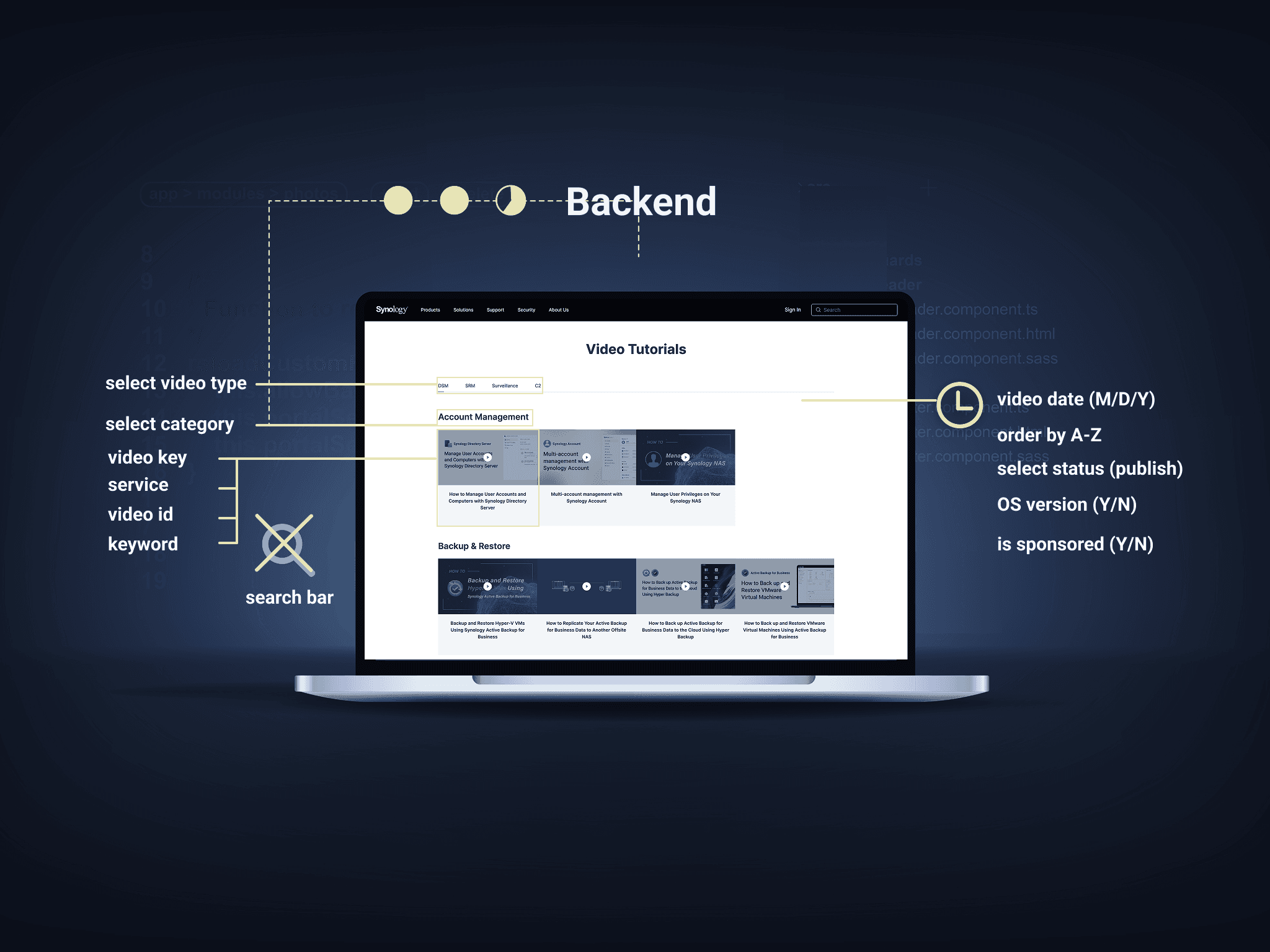
The Synology video page runs on a custom backend system, where content is manually updated through editable slots. Upon receiving the project, my first step was to audit the backend to identify editable fields and understand the entire integration logic. I mapped out the boundaries between what the design team could change and what required engineering intervention.
1️⃣ Criteria for Competitor Selection: Software companies with video tutorial pages 2️⃣ Analysis Dimensions: Information architecture, filtering mechanisms, search functionality, and visual hierarchy 3️⃣ Testing Method: Conducted usability tests with 11 colleagues from different nationalities 4️⃣ Decision-Making Process: Combined quantitative feedback with stakeholder discussions
After completing the competitive analysis, I distilled three potential design directions: 1️⃣ A top search bar inspired by Synology's Knowledge Base 2️⃣ Tab-style navigation referencing Purestorage 3️⃣ A card-based waterfall layout modeled after Adobe I created low-fidelity prototypes and conducted usability testing with 11 colleagues from diverse cultural backgrounds. The focus was on findability and clarity of categorization. The most favored concept combined a card-based layout with top-level filters and emphasized video titles—striking the best balance between structure and scannability.
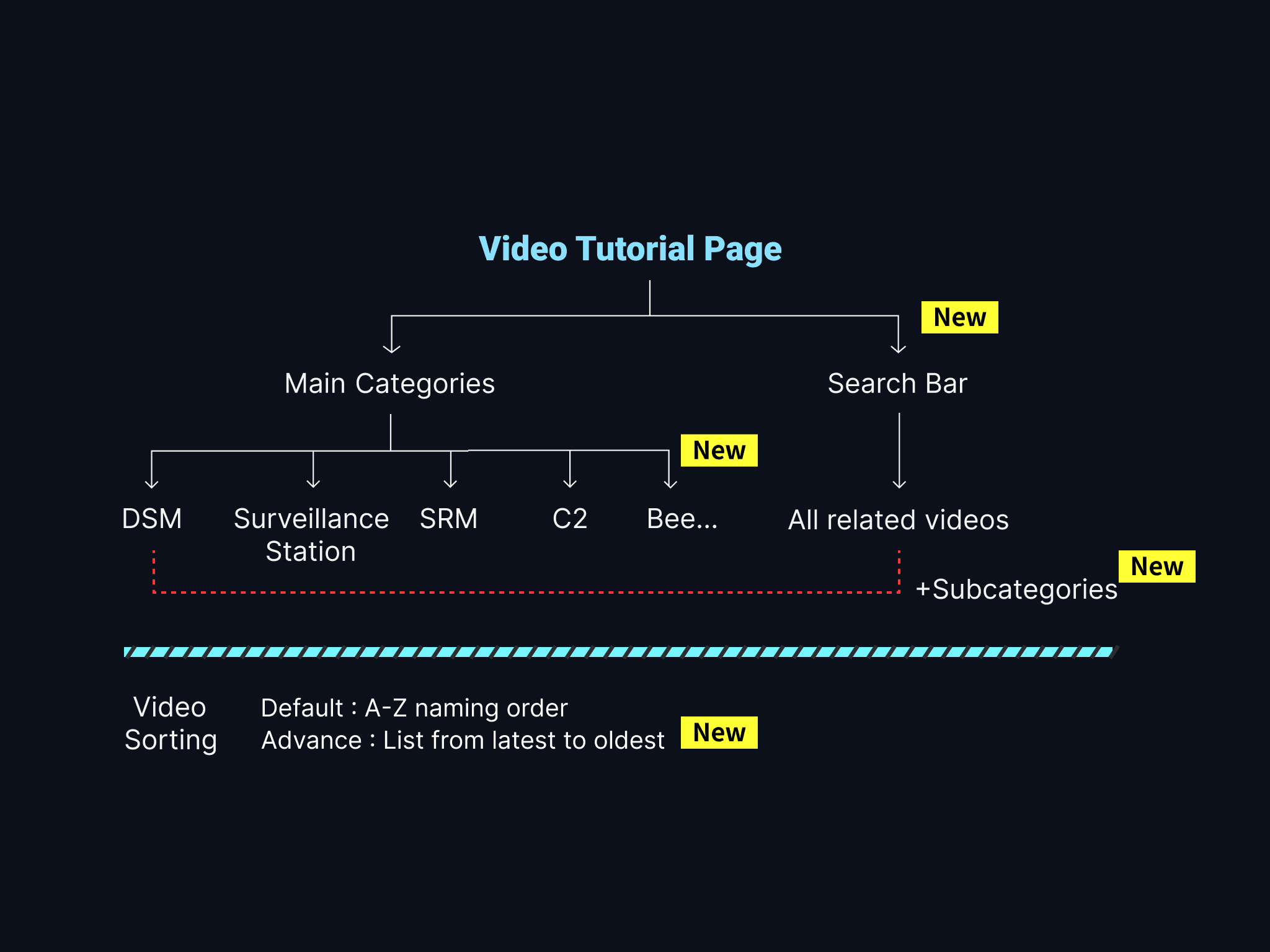
Technical Constraints: • The backend system could not be significantly modified • Engineering support was limited • Backward compatibility with existing content was required Strategic Solutions: • Design-Driven Approach: Reorganized the information architecture to improve navigation without backend changes • Progressive Enhancement: Preserved the core system while refining the front-end experience • Resource Efficiency: Made one-time changes with long-term benefits I simplified a complex category system into an intuitive filter to improve user navigation and clarity. Additionally, I created video management system flowchart for all of my team members to take a look, ensuring everyone was on the same page.
Phase 1: In-Depth System Audit Why start with backend analysis? Because design must align with technical realities. I began by auditing the entire backend system to understand: ✅ The scope and limitations of editable fields ✅ The content management workflow ✅ The boundaries of engineering involvement Phase 2: User-Centered Redesign With system constraints in mind, I reframed the design from a user perspective: • How to maximize user experience within the existing framework • Which features require engineering support and which can be addressed through design • How to balance technical feasibility with user needs
02 Structure Analysis
02 Structure Analysis
Technical Constraints: • The backend system could not be significantly modified • Engineering support was limited • Backward compatibility with existing content was required Strategic Solutions: • Design-Driven Approach: Reorganized the information architecture to improve navigation without backend changes • Progressive Enhancement: Preserved the core system while refining the front-end experience • Resource Efficiency: Made one-time changes with long-term benefits I simplified a complex category system into an intuitive filter to improve user navigation and clarity. Additionally, I created video management system flowchart for all of my team members to take a look, ensuring everyone was on the same page.
1️⃣ Criteria for Competitor Selection: Software companies with video tutorial pages 2️⃣ Analysis Dimensions: Information architecture, filtering mechanisms, search functionality, and visual hierarchy 3️⃣ Testing Method: Conducted usability tests with 11 colleagues from different nationalities 4️⃣ Decision-Making Process: Combined quantitative feedback with stakeholder discussions
The Synology video page runs on a custom backend system, where content is manually updated through editable slots. Upon receiving the project, my first step was to audit the backend to identify editable fields and understand the entire integration logic. I mapped out the boundaries between what the design team could change and what required engineering intervention.
The Synology video page runs on a custom backend system, where content is manually updated through editable slots. Upon receiving the project, my first step was to audit the backend to identify editable fields and understand the entire integration logic. I mapped out the boundaries between what the design team could change and what required engineering intervention.
03 Process: Two-Phase Adjustment
03 Process: Two-Phase Adjustment
Phase 1: In-Depth System Audit Why start with backend analysis? Because design must align with technical realities. I began by auditing the entire backend system to understand: ✅ The scope and limitations of editable fields ✅ The content management workflow ✅ The boundaries of engineering involvement Phase 2: User-Centered Redesign With system constraints in mind, I reframed the design from a user perspective: • How to maximize user experience within the existing framework • Which features require engineering support and which can be addressed through design • How to balance technical feasibility with user needs
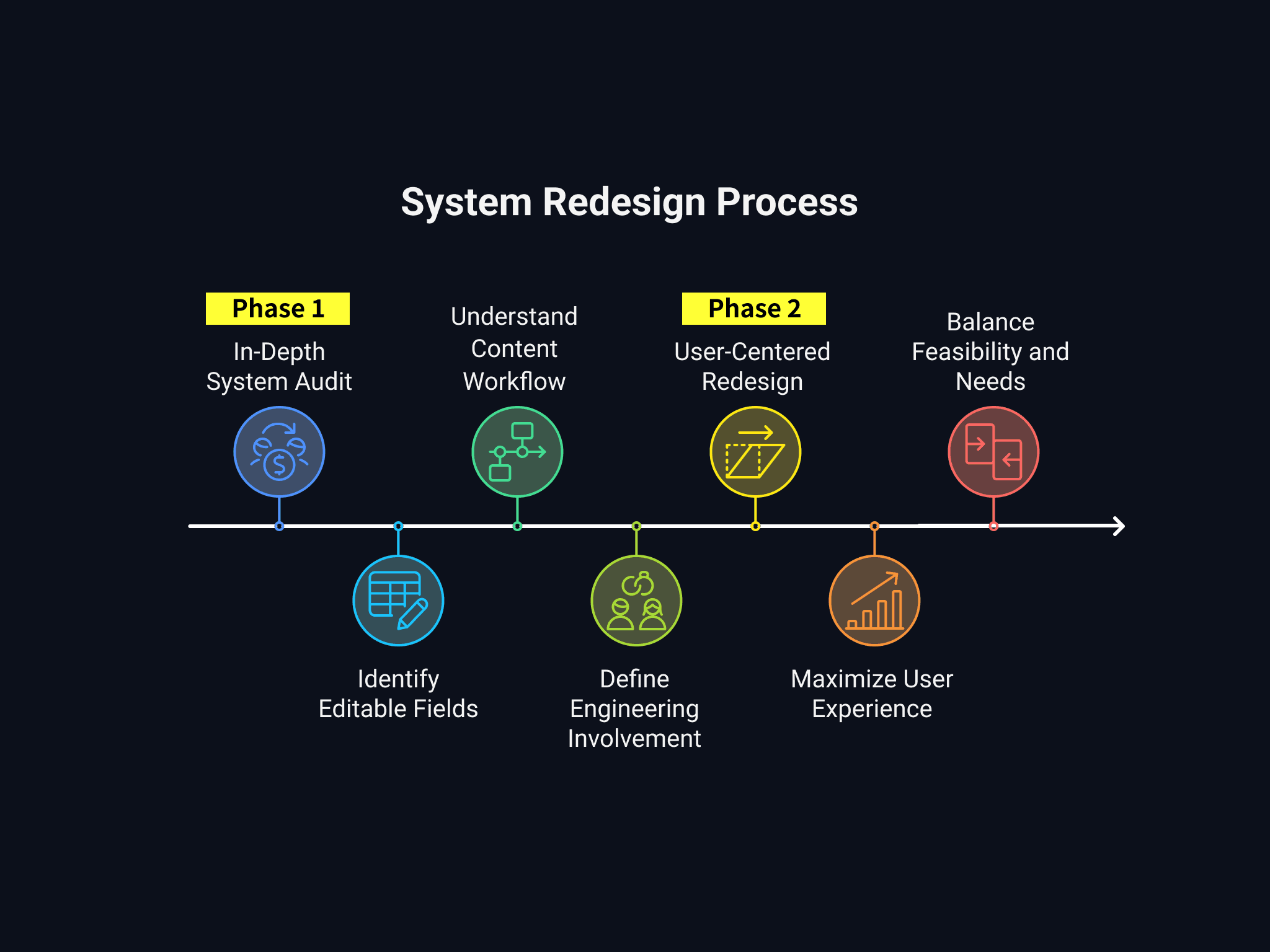
Phase 1: In-Depth System Audit Why start with backend analysis? Because design must align with technical realities. I began by auditing the entire backend system to understand: ✅ The scope and limitations of editable fields ✅ The content management workflow ✅ The boundaries of engineering involvement Phase 2: User-Centered Redesign With system constraints in mind, I reframed the design from a user perspective: • How to maximize user experience within the existing framework • Which features require engineering support and which can be addressed through design • How to balance technical feasibility with user needs
04 Challenge: Minimal Backend Changes
04 Challenge: Minimal Backend Changes
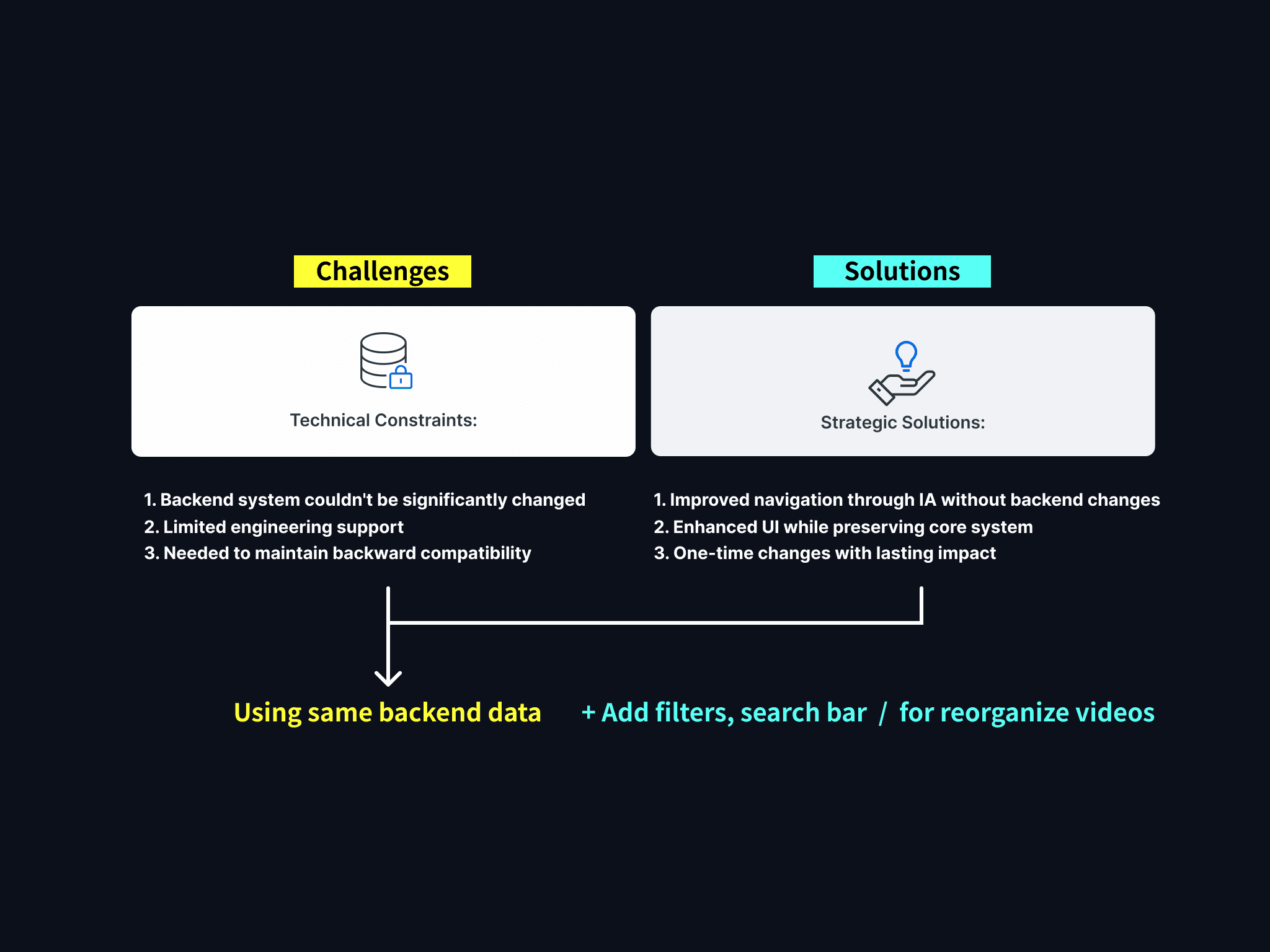
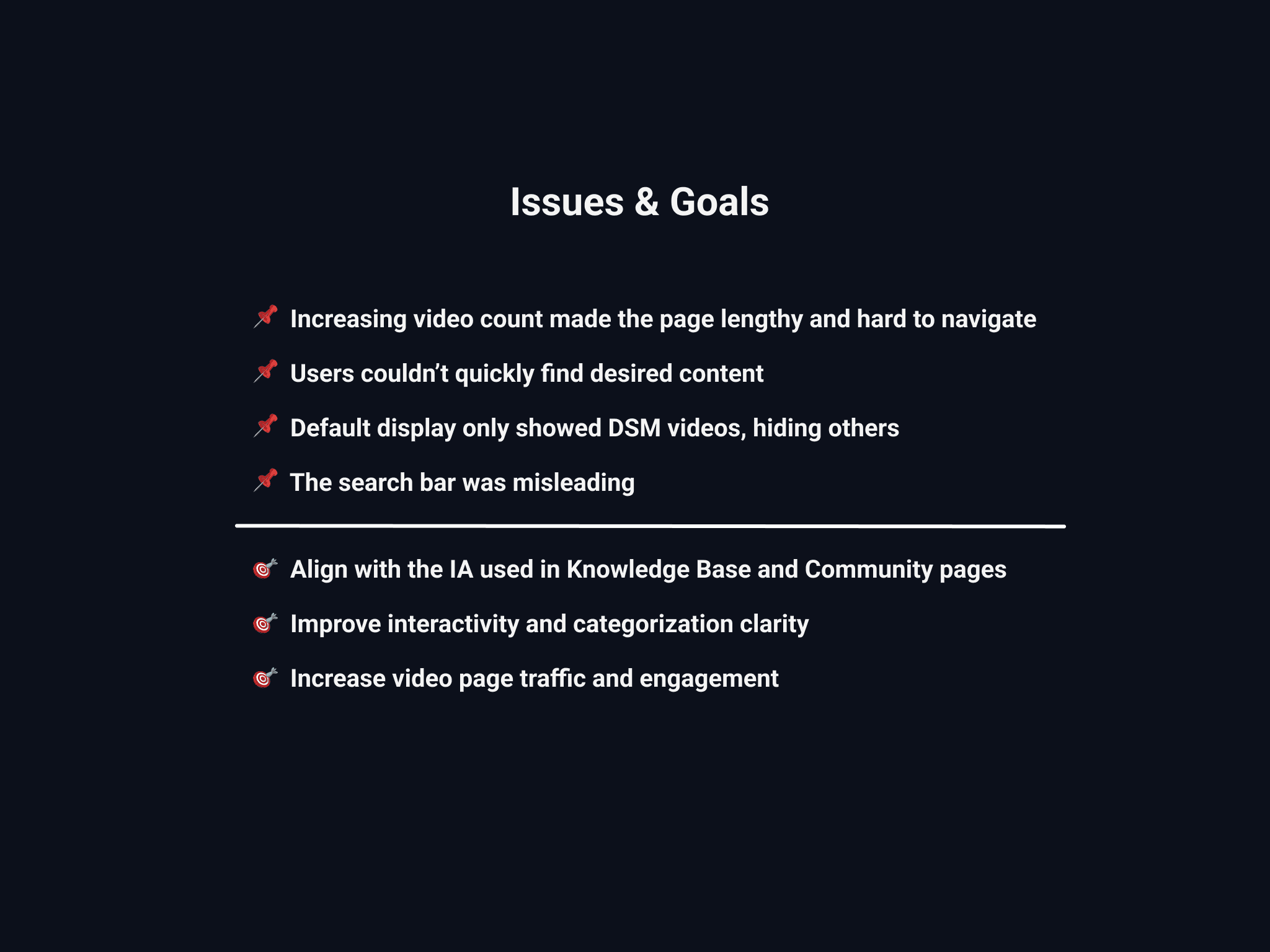
Technical Constraints: • The backend system could not be significantly modified • Engineering support was limited • Backward compatibility with existing content was required Strategic Solutions: • Design-Driven Approach: Reorganized the information architecture to improve navigation without backend changes • Progressive Enhancement: Preserved the core system while refining the front-end experience • Resource Efficiency: Made one-time changes with long-term benefits I simplified a complex category system into an intuitive filter to improve user navigation and clarity. Additionally, I created video management system flowchart for all of my team members to take a look, ensuring everyone was on the same page.
Technical Constraints: • The backend system could not be significantly modified • Engineering support was limited • Backward compatibility with existing content was required Strategic Solutions: • Design-Driven Approach: Reorganized the information architecture to improve navigation without backend changes • Progressive Enhancement: Preserved the core system while refining the front-end experience • Resource Efficiency: Made one-time changes with long-term benefits I simplified a complex category system into an intuitive filter to improve user navigation and clarity. Additionally, I created video management system flowchart for all of my team members to take a look, ensuring everyone was on the same page.
05 Research: Competitive Analysis
05 Research: Competitive Analysis
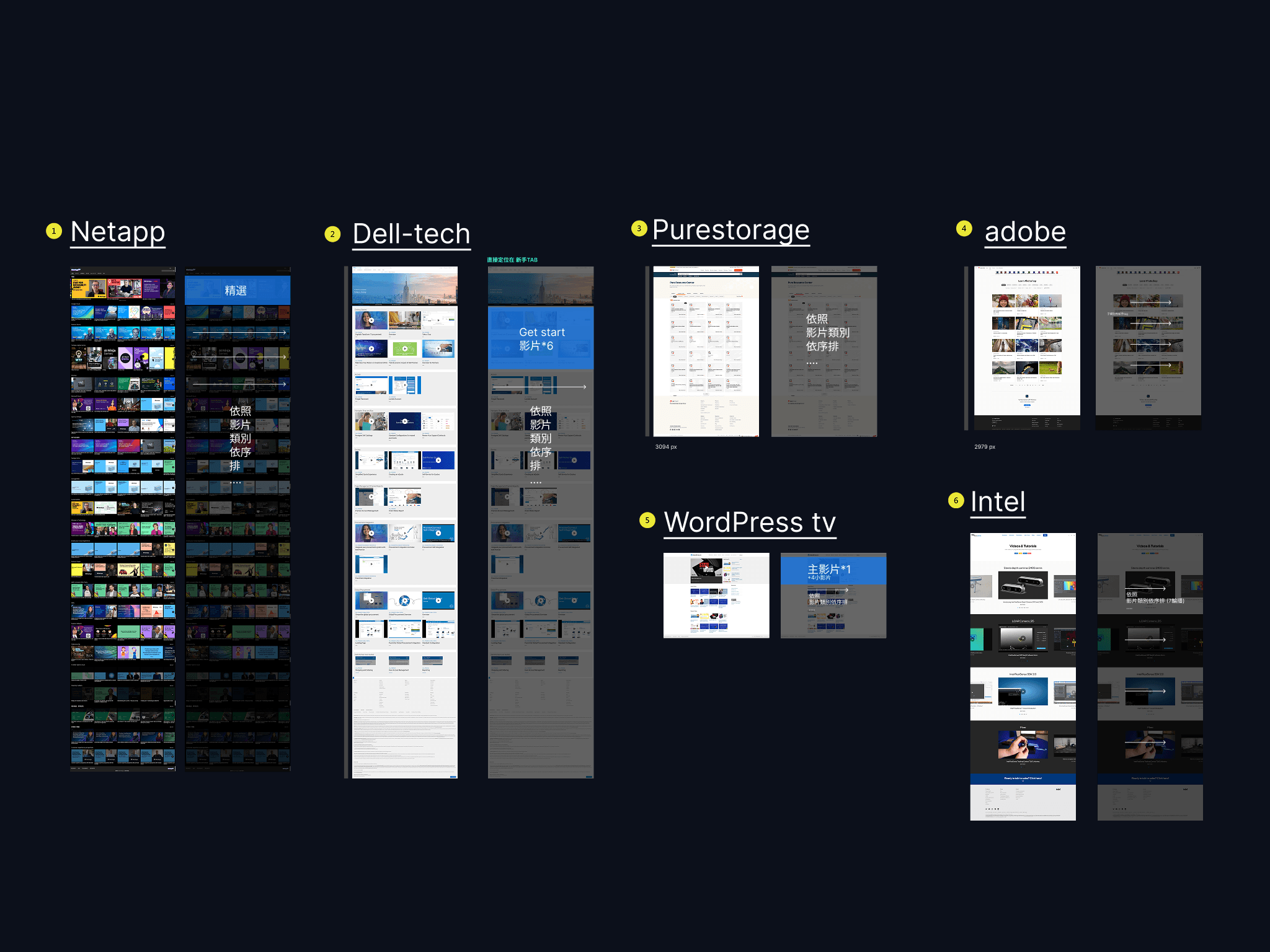
1️⃣ Criteria for Competitor Selection: Software companies with video tutorial pages 2️⃣ Analysis Dimensions: Information architecture, filtering mechanisms, search functionality, and visual hierarchy 3️⃣ Testing Method: Conducted usability tests with 11 colleagues from different nationalities 4️⃣ Decision-Making Process: Combined quantitative feedback with stakeholder discussions
1️⃣ Criteria for Competitor Selection: Software companies with video tutorial pages 2️⃣ Analysis Dimensions: Information architecture, filtering mechanisms, search functionality, and visual hierarchy 3️⃣ Testing Method: Conducted usability tests with 11 colleagues from different nationalities 4️⃣ Decision-Making Process: Combined quantitative feedback with stakeholder discussions
06 Lofi UI Design
06 Lofi UI Design
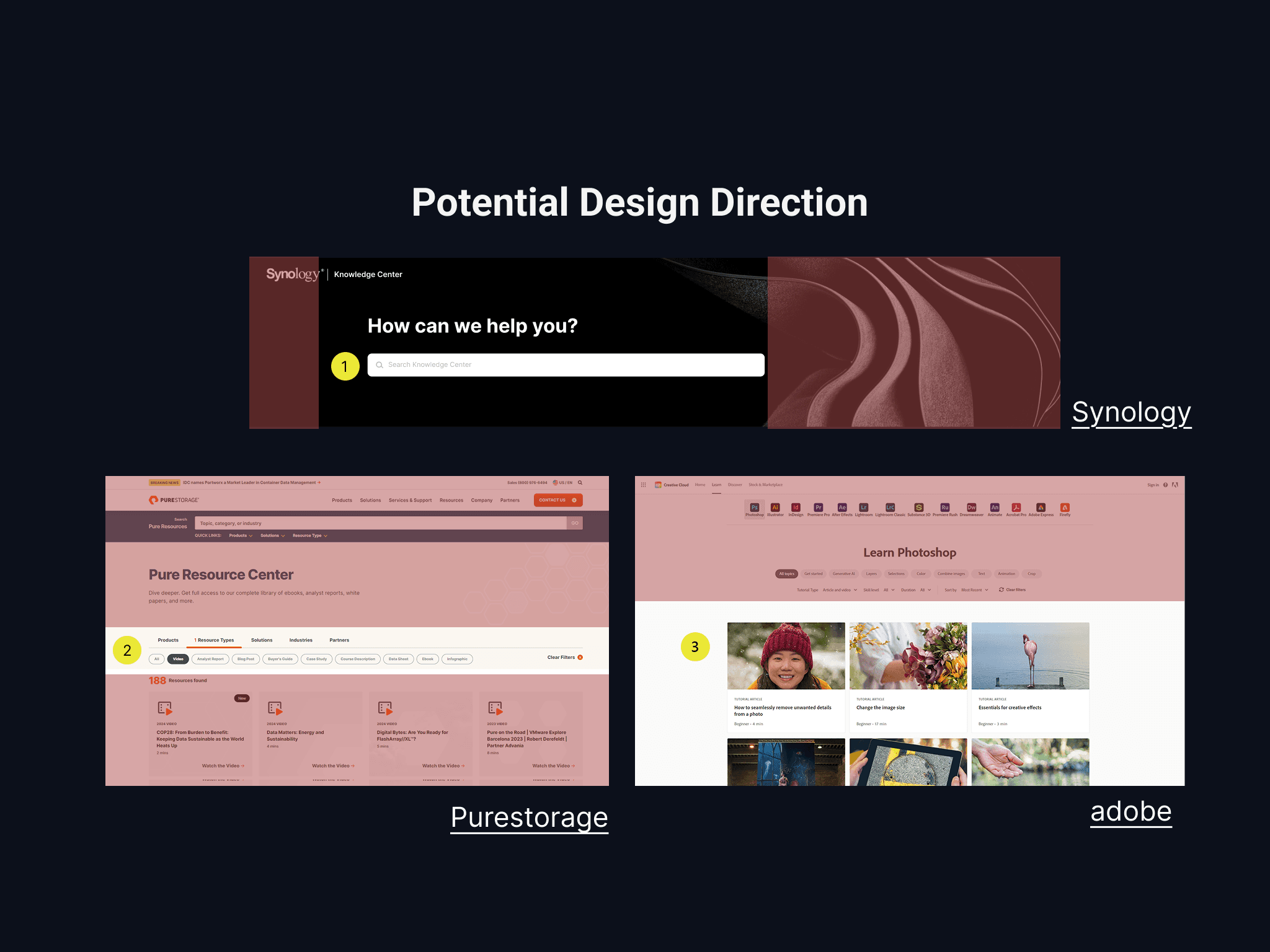
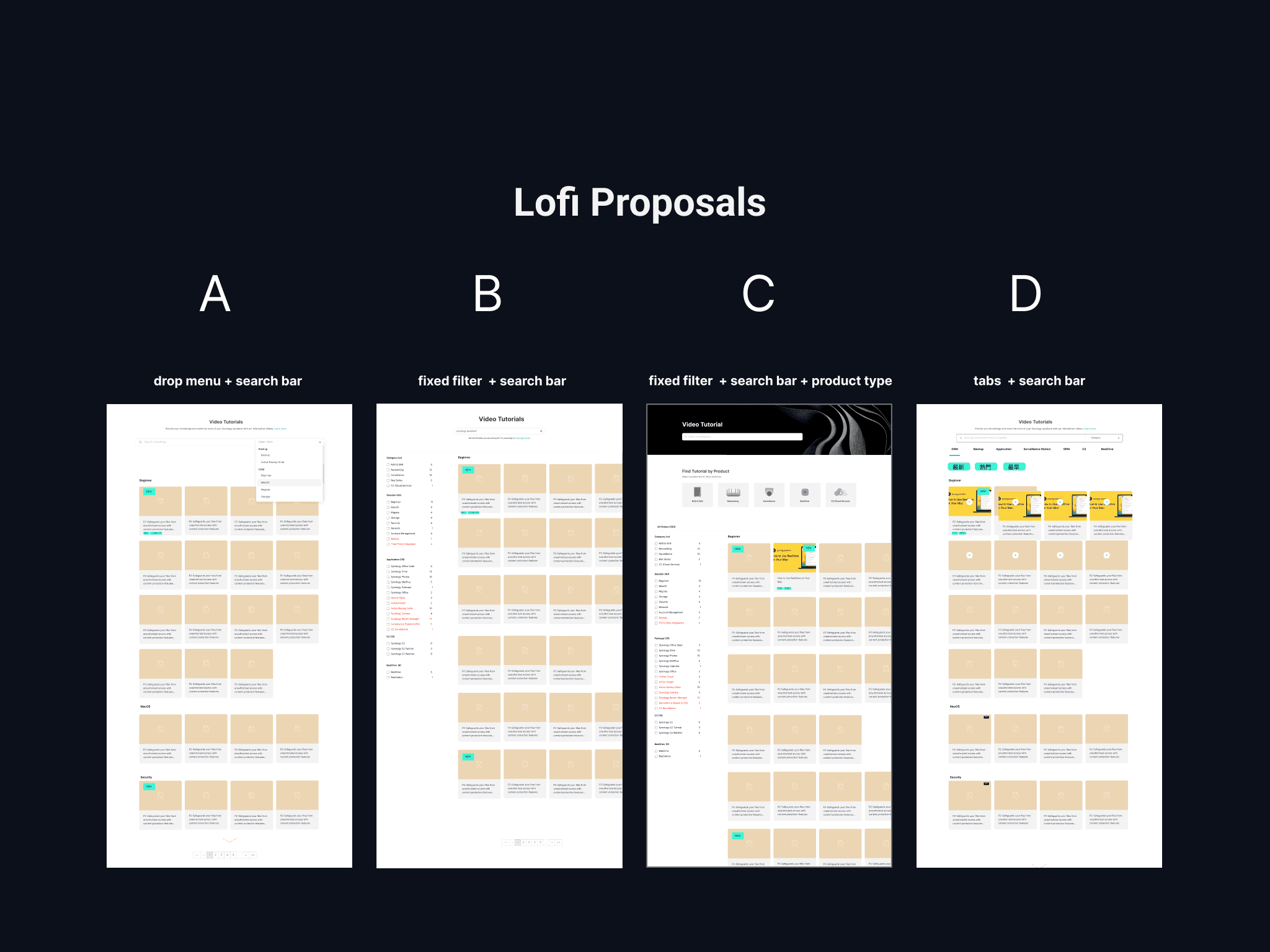
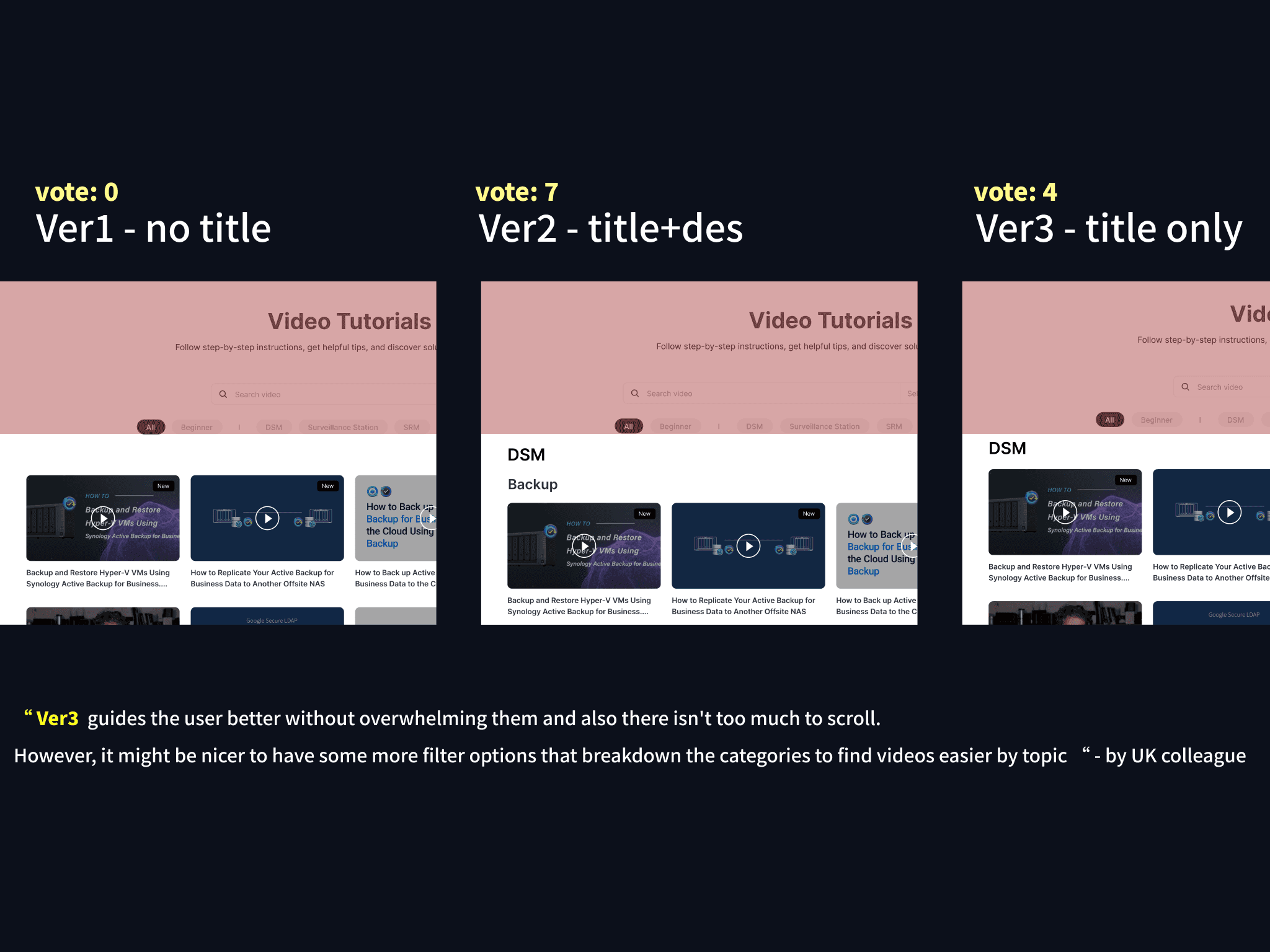
After completing the competitive analysis, I distilled three potential design directions: 1️⃣ A top search bar inspired by Synology's Knowledge Base 2️⃣ Tab-style navigation referencing Purestorage 3️⃣ A card-based waterfall layout modeled after Adobe I created low-fidelity prototypes and conducted usability testing with 11 colleagues from diverse cultural backgrounds. The focus was on findability and clarity of categorization. The most favored concept combined a card-based layout with top-level filters and emphasized video titles—striking the best balance between structure and scannability.
After completing the competitive analysis, I distilled three potential design directions: 1️⃣ A top search bar inspired by Synology's Knowledge Base 2️⃣ Tab-style navigation referencing Purestorage 3️⃣ A card-based waterfall layout modeled after Adobe I created low-fidelity prototypes and conducted usability testing with 11 colleagues from diverse cultural backgrounds. The focus was on findability and clarity of categorization. The most favored concept combined a card-based layout with top-level filters and emphasized video titles—striking the best balance between structure and scannability.
07 Final Web Design
07 Final Web Design
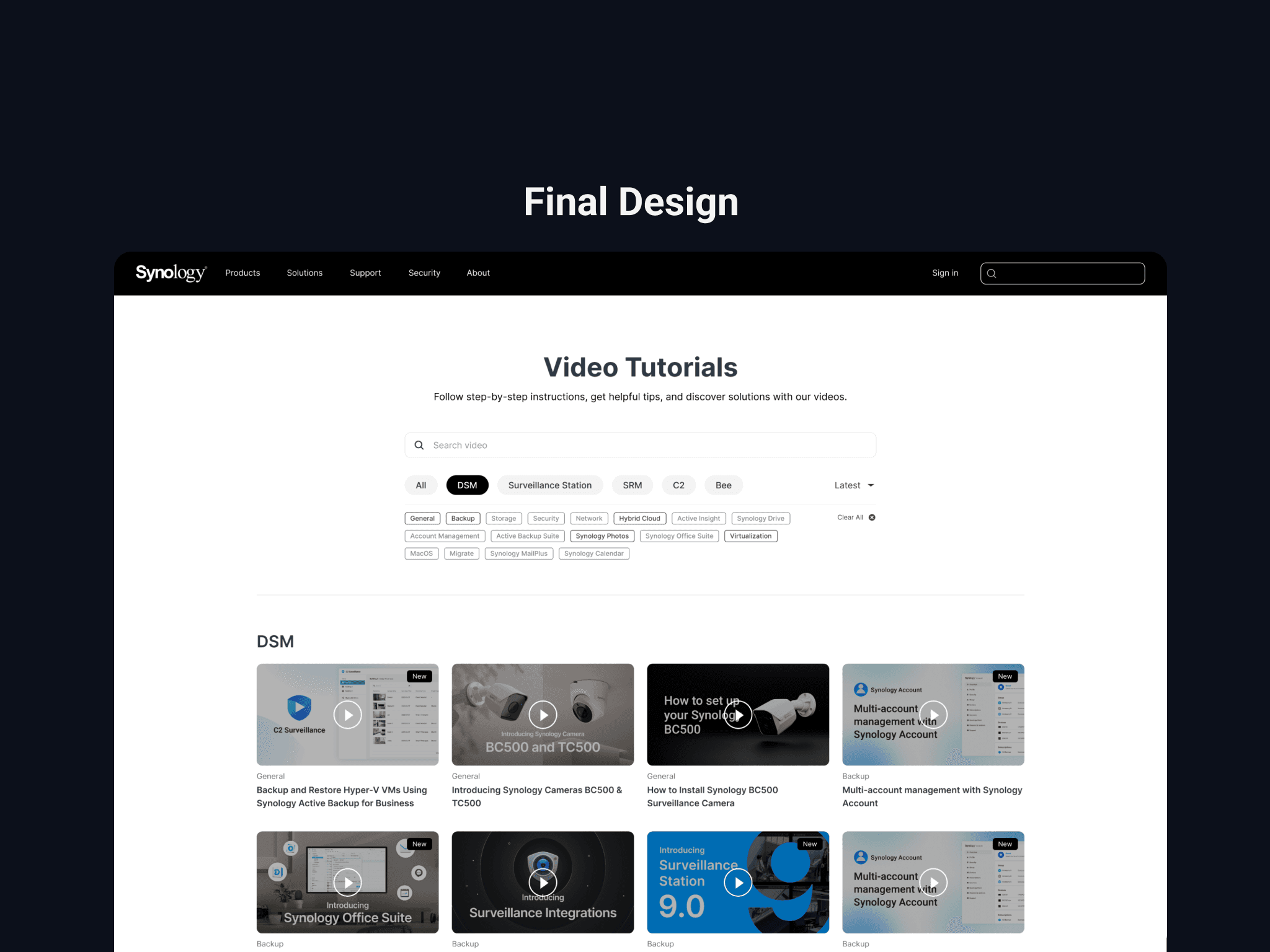
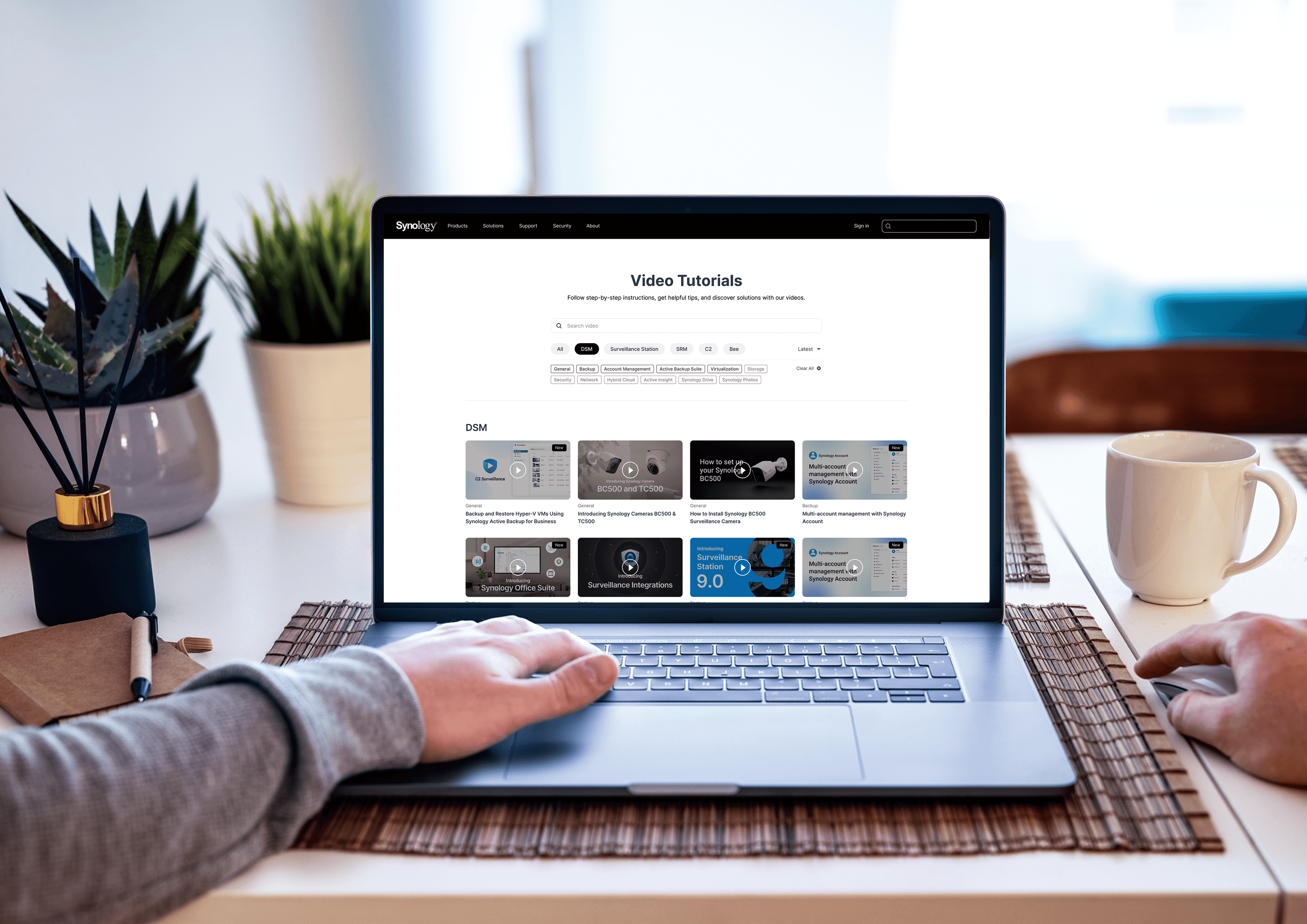
High-Fidelity Design & Development I collaborated closely with the visual designer to deliver the final high-fidelity mockups. Design Priorities: ✅️ Maintain brand consistency with Synology’s design language ✅️ Ensure responsive layout across various devices ✅️ Implement accessibility best practices following WCAG standards ✅️ Incorporate micro-interactions to enhance user engagement Technical Collaboration: I organized joint meetings with frontend and backend developers to clarify implementation details and edge-case handling, ensuring the design could be executed smoothly within technical constraints.
High-Fidelity Design & Development I collaborated closely with the visual designer to deliver the final high-fidelity mockups. Design Priorities: ✅️ Maintain brand consistency with Synology’s design language ✅️ Ensure responsive layout across various devices ✅️ Implement accessibility best practices following WCAG standards ✅️ Incorporate micro-interactions to enhance user engagement Technical Collaboration: I organized joint meetings with frontend and backend developers to clarify implementation details and edge-case handling, ensuring the design could be executed smoothly within technical constraints.

08 Data Analytics
08 Data Analytics
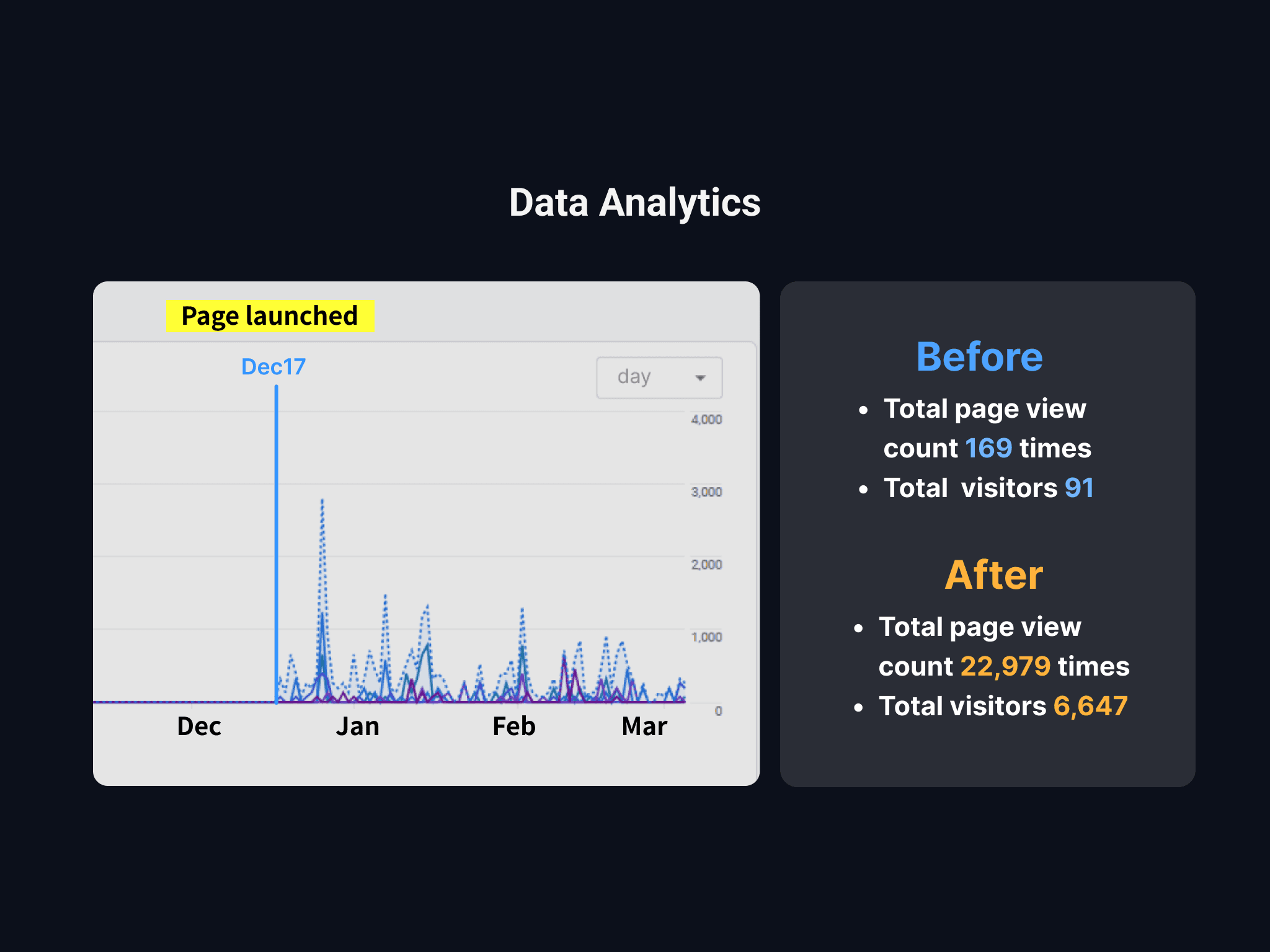
The redesigned page launched on December 17, 2024. I tracked its performance by comparing metrics from the two months before and after the launch—without any additional advertising or promotional campaigns. 💡 Key Highlights: • Total page views: 169 → 22,297 (+13,094%) • Video clicks: 92 → 16,176 (+17,487%) • Average videos viewed per user: 2.42 → 3.24 (+34%) • Time on page: Remained steady at 1m30s, indicating quality retention 💡 SEO Performance: • Google became the primary traffic source • Organic search traffic increased over 130x • Results confirmed that the redesigned information architecture significantly improved search engine friendliness 💡 User Behavior Insights: • Search feature usage: 7.5% — quickly adopted by users • Filter usage: 2% — served as a helpful secondary tool • Content findability: greatly improved, reducing user friction
The redesigned page launched on December 17, 2024. I tracked its performance by comparing metrics from the two months before and after the launch—without any additional advertising or promotional campaigns. 💡 Key Highlights: • Total page views: 169 → 22,297 (+13,094%) • Video clicks: 92 → 16,176 (+17,487%) • Average videos viewed per user: 2.42 → 3.24 (+34%) • Time on page: Remained steady at 1m30s, indicating quality retention 💡 SEO Performance: • Google became the primary traffic source • Organic search traffic increased over 130x • Results confirmed that the redesigned information architecture significantly improved search engine friendliness 💡 User Behavior Insights: • Search feature usage: 7.5% — quickly adopted by users • Filter usage: 2% — served as a helpful secondary tool • Content findability: greatly improved, reducing user friction
09 Key Learnings
09 Key Learnings
✅ Balancing technical feasibility with user needs ✅ Redesigning content management pages across other products ✅ Enhancing search and filter functionalities in similar contexts ✅Improving user experience under strict technical limitations ✅Managing complex, cross-departmental collaboration projects 🚩Refined Design Methodology: This project led to the development of a constraint-driven design workflow—a scalable and repeatable process that can be applied to other systems with similar limitations.
✅ Balancing technical feasibility with user needs ✅ Redesigning content management pages across other products ✅ Enhancing search and filter functionalities in similar contexts ✅Improving user experience under strict technical limitations ✅Managing complex, cross-departmental collaboration projects 🚩Refined Design Methodology: This project led to the development of a constraint-driven design workflow—a scalable and repeatable process that can be applied to other systems with similar limitations.
Redesigning within constraints taught me the power of smart collaboration and focused UX. By aligning with engineering early and working cross-functionally, me and my team transformed a legacy system into a high-impact, user-friendly experience. The result? Happier teams—and a 130x boost in organic traffic, all through design.
Phase 1: In-Depth System Audit Why start with backend analysis? Because design must align with technical realities. I began by auditing the entire backend system to understand: ✅ The scope and limitations of editable fields ✅ The content management workflow ✅ The boundaries of engineering involvement Phase 2: User-Centered Redesign With system constraints in mind, I reframed the design from a user perspective: • How to maximize user experience within the existing framework • Which features require engineering support and which can be addressed through design • How to balance technical feasibility with user needs
The redesigned page launched on December 17, 2024. I tracked its performance by comparing metrics from the two months before and after the launch—without any additional advertising or promotional campaigns. 💡 Key Highlights: • Total page views: 169 → 22,297 (+13,094%) • Video clicks: 92 → 16,176 (+17,487%) • Average videos viewed per user: 2.42 → 3.24 (+34%) • Time on page: Remained steady at 1m30s, indicating quality retention 💡 SEO Performance: • Google became the primary traffic source • Organic search traffic increased over 130x • Results confirmed that the redesigned information architecture significantly improved search engine friendliness 💡 User Behavior Insights: • Search feature usage: 7.5% — quickly adopted by users • Filter usage: 2% — served as a helpful secondary tool • Content findability: greatly improved, reducing user friction
High-Fidelity Design & Development I collaborated closely with the visual designer to deliver the final high-fidelity mockups. Design Priorities: ✅️ Maintain brand consistency with Synology’s design language ✅️ Ensure responsive layout across various devices ✅️ Implement accessibility best practices following WCAG standards ✅️ Incorporate micro-interactions to enhance user engagement Technical Collaboration: I organized joint meetings with frontend and backend developers to clarify implementation details and edge-case handling, ensuring the design could be executed smoothly within technical constraints.
Technical Constraints: • The backend system could not be significantly modified • Engineering support was limited • Backward compatibility with existing content was required Strategic Solutions: • Design-Driven Approach: Reorganized the information architecture to improve navigation without backend changes • Progressive Enhancement: Preserved the core system while refining the front-end experience • Resource Efficiency: Made one-time changes with long-term benefits I simplified a complex category system into an intuitive filter to improve user navigation and clarity. Additionally, I created video management system flowchart for all of my team members to take a look, ensuring everyone was on the same page.
✅ Balancing technical feasibility with user needs ✅ Redesigning content management pages across other products ✅ Enhancing search and filter functionalities in similar contexts ✅Improving user experience under strict technical limitations ✅Managing complex, cross-departmental collaboration projects 🚩Refined Design Methodology: This project led to the development of a constraint-driven design workflow—a scalable and repeatable process that can be applied to other systems with similar limitations.
Redesigning within constraints taught me the power of smart collaboration and focused UX. By aligning with engineering early and working cross-functionally, me and my team transformed a legacy system into a high-impact, user-friendly experience. The result? Happier teams—and a 130x boost in organic traffic, all through design.
Redesigning within constraints taught me the power of smart collaboration and focused UX. By aligning with engineering early and working cross-functionally, me and my team transformed a legacy system into a high-impact, user-friendly experience. The result? Happier teams—and a 130x boost in organic traffic, all through design.
Redesigning within constraints taught me the power of smart collaboration and focused UX. By aligning with engineering early and working cross-functionally, me and my team transformed a legacy system into a high-impact, user-friendly experience. The result? Happier teams—and a 130x boost in organic traffic, all through design.
Copyright © 2026 Linda-in-design. All rights reserved.