Metro Taipei Go App
Official Taipei Metro App Redesign
Metro Taipei GO was designed to deliver a user-centered metro experience by streamlining access to Taipei Metro services. With over 2.6 million downloads, I restructured the information architecture and unified map functions into a single entry point, reducing navigation friction and driving a 22.2% increase in user satisfaction on the Google Play Store.
Metro Taipei GO was designed to deliver a user-centered metro experience by streamlining access to Taipei Metro services. With over 2.6 million downloads, I restructured the information architecture and unified map functions into a single entry point, reducing navigation friction and driving a 22.2% increase in user satisfaction on the Google Play Store.
Client / Industry
Taipei Rapid Transit Corporation / Transportation
Linda's Role
UIUX Designer
Skills
User Journey, UI design Information Architecture Design System, Usability Test
Date
Jan - Oct 2023
01 Where It All Began
01 Where It All Began
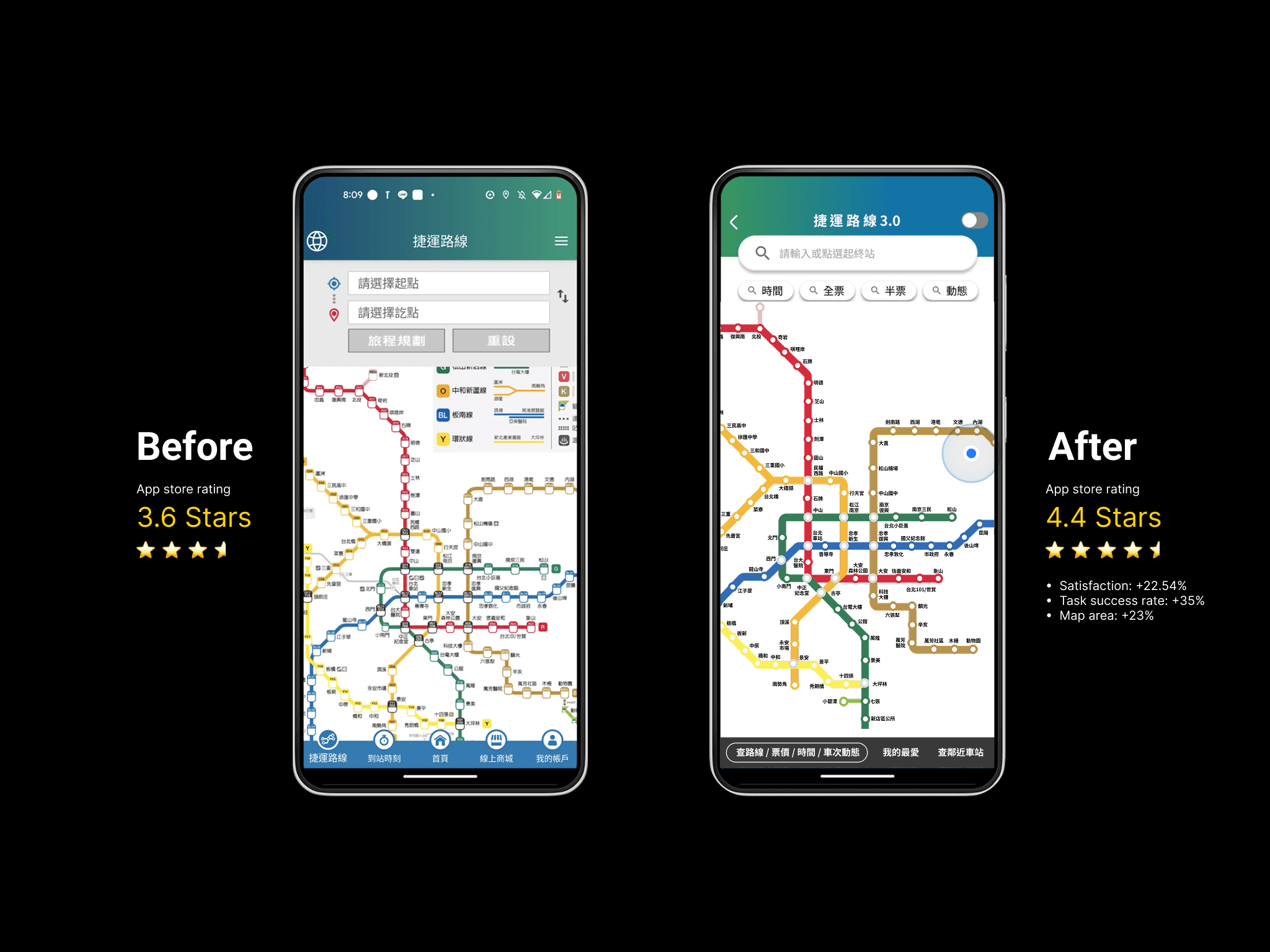
Comparing the old and new versions: • Satisfaction: +22.54% • Task success rate: +35% • Map area: +23% • Statistical analysis confirmed it: t(7) = -4.212, p = .004 — this was no coincidence.
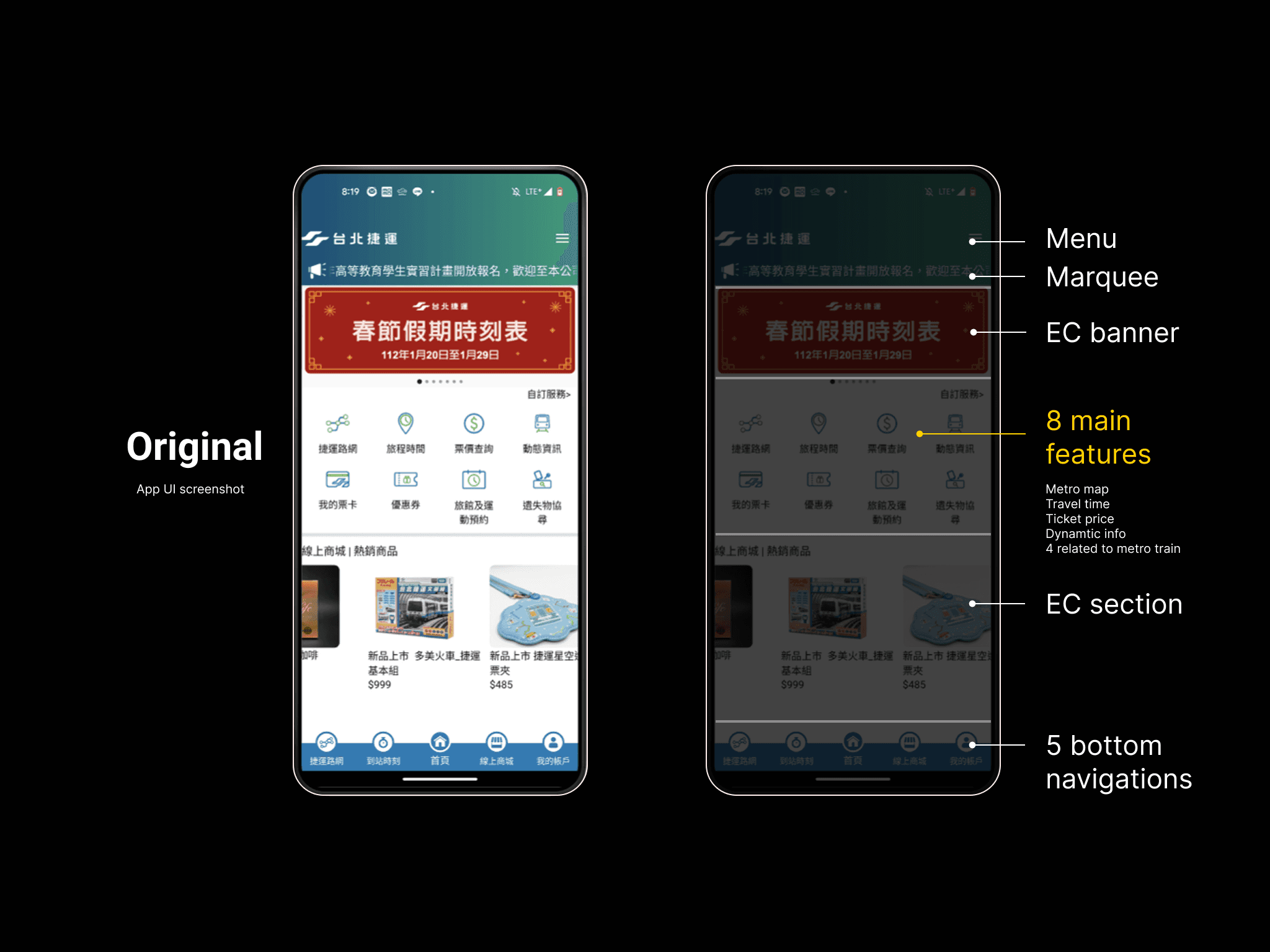
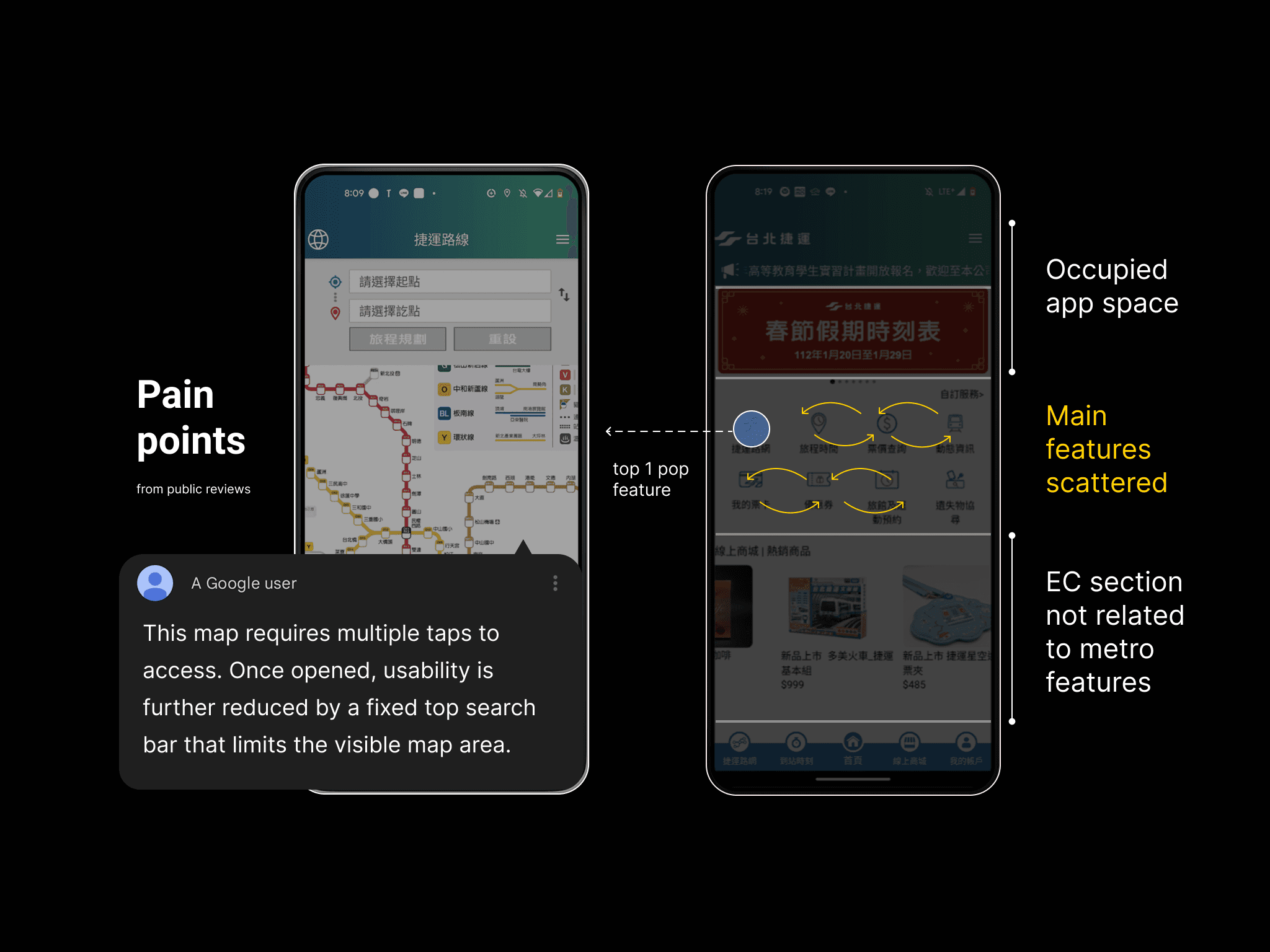
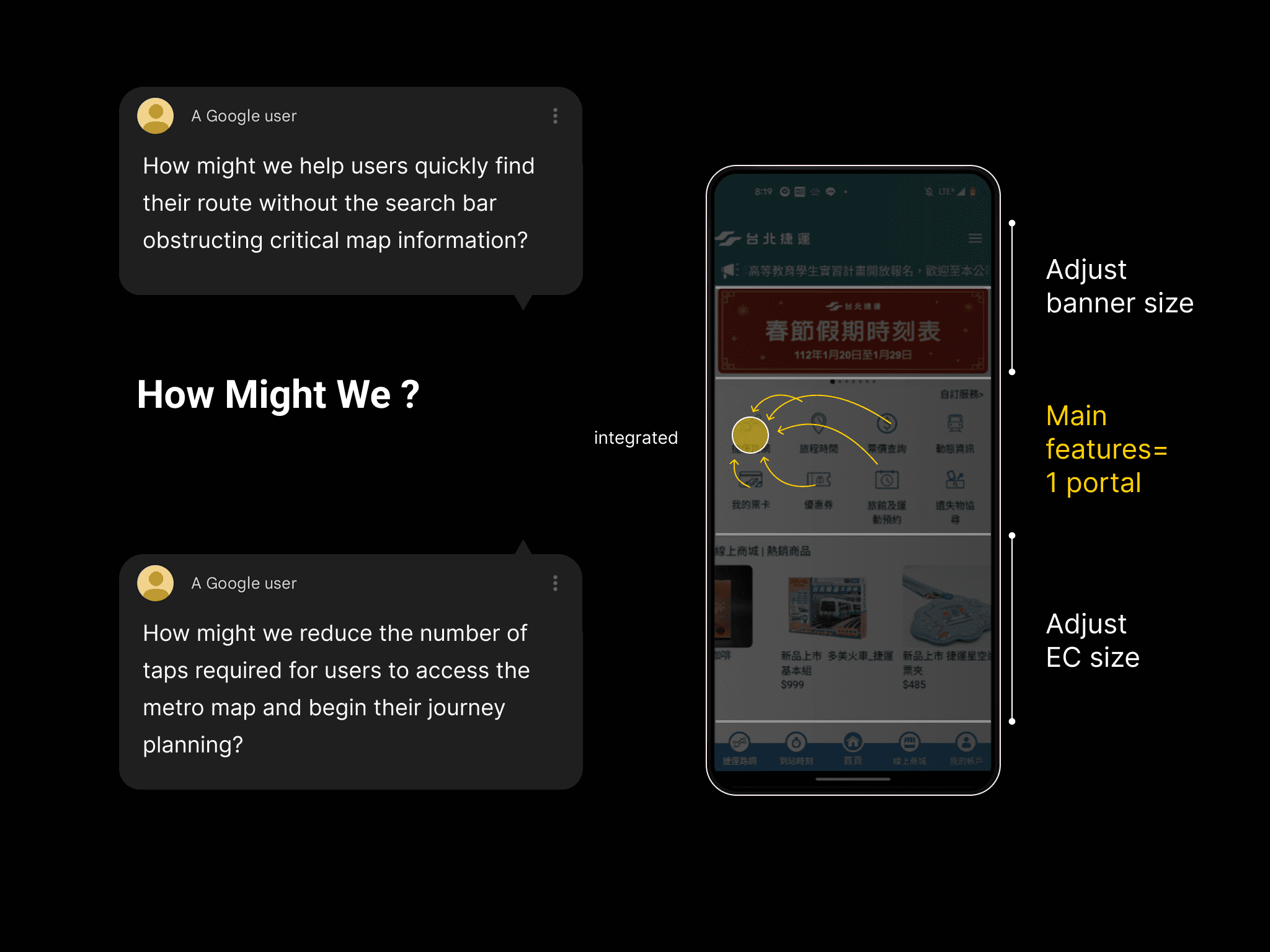
The Taipei Metro Go app was overloaded with advertisements and commercial content on its main portal, while its core route-planning features were fragmented across multiple sub-sections. Essential information—such as ticket pricing, estimated travel time, and real-time updates—were separated into different pages, forcing users to repeatedly return to the main portal to access related functions. The lack of integration between these features created an inefficient and frustrating commuting experience. In early 2023, Taipei Metro initiated a nationwide UI/UX hackathon to redesign the app and improve the commuter experience. I was the only UIUX designer in this project.
02 Persona / User Journey / Competitor Analysis
02 Persona / User Journey / Competitor Analysis
04 Usability Testing
04 Usability Testing
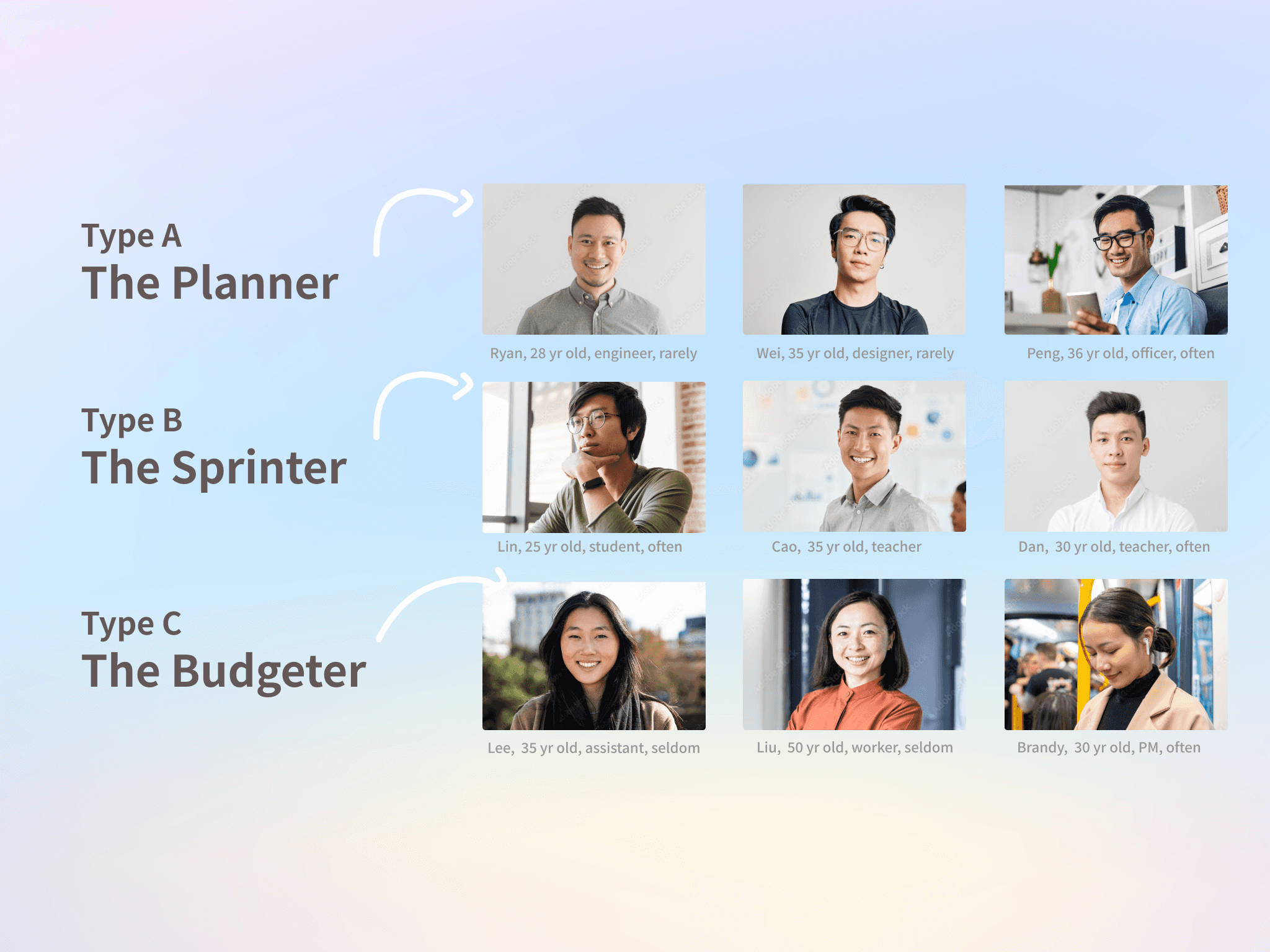
Field Research in the Real World — 9 People, 9 Ways of Using the Metro I didn’t sit in a room making guesses—we hit the streets. From an MRT online forum, I gathered 41 survey responses and conducted in-depth interviews with 9 participants (aged 19 to 50) from diverse backgrounds. What I discovered were three unique “metro personas”: A. The Planner – Mr. R (31, Web Engineer) Arrives 15 minutes early. Needs to know exactly when the next train is coming to stay on schedule. B. The Sprinter – Mr. Lin (25, Student) Always rushing. Prioritizes real-time updates because every second counts. C. The Budgeter – Ms. Lee (31, Medical Researcher) On a tight budget, she uses the map to explore which station is cheapest to enter—even if it means walking farther.
The Taipei Metro Go app was overloaded with advertisements and commercial content on its main portal, while its core route-planning features were fragmented across multiple sub-sections. Essential information—such as ticket pricing, estimated travel time, and real-time updates—were separated into different pages, forcing users to repeatedly return to the main portal to access related functions. The lack of integration between these features created an inefficient and frustrating commuting experience. In early 2023, Taipei Metro initiated a nationwide UI/UX hackathon to redesign the app and improve the commuter experience. I was the only UIUX designer in this project.
One better button could make a commuter less anxious, or help a tourist feel more confident in a foreign city.
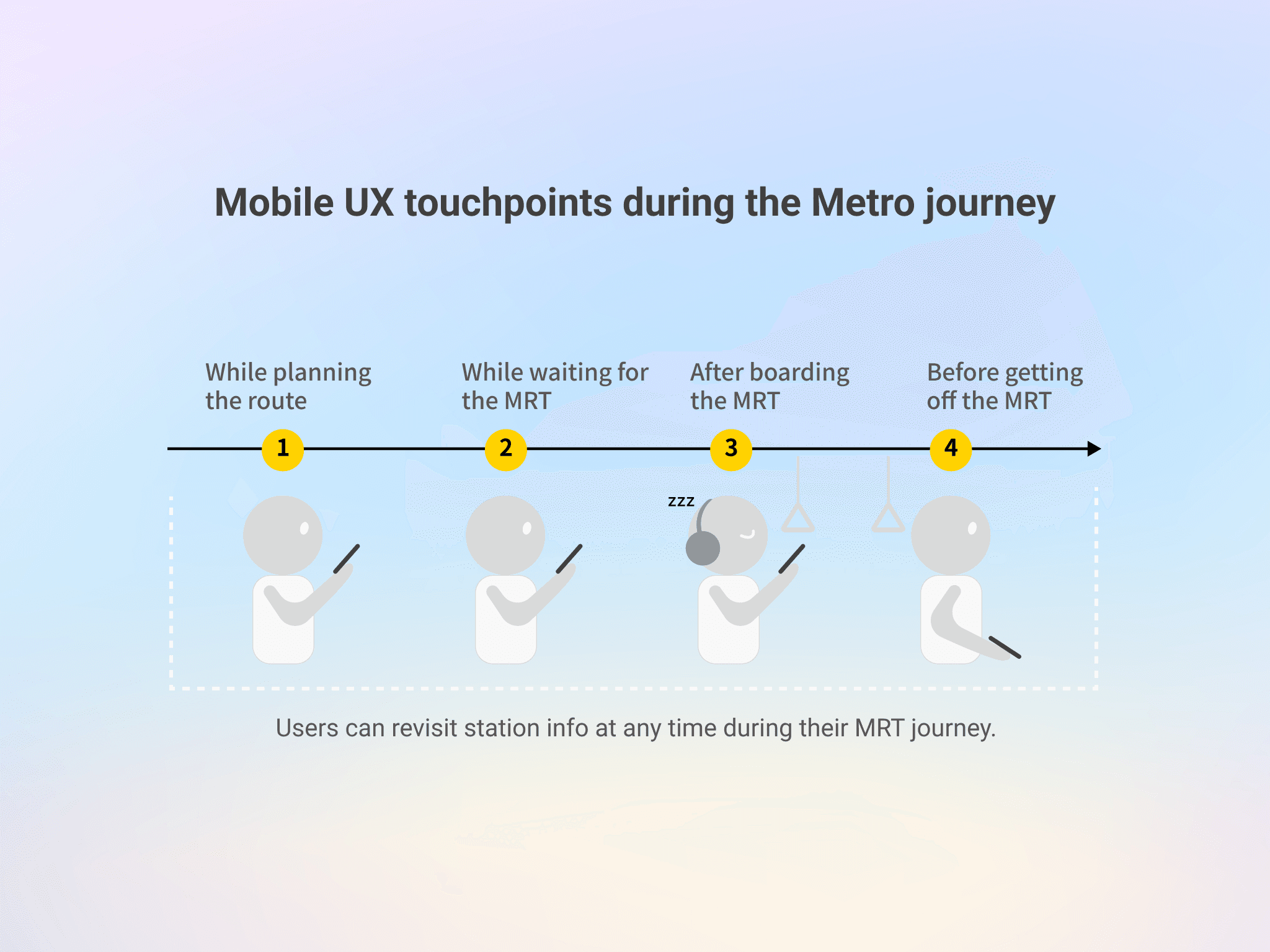
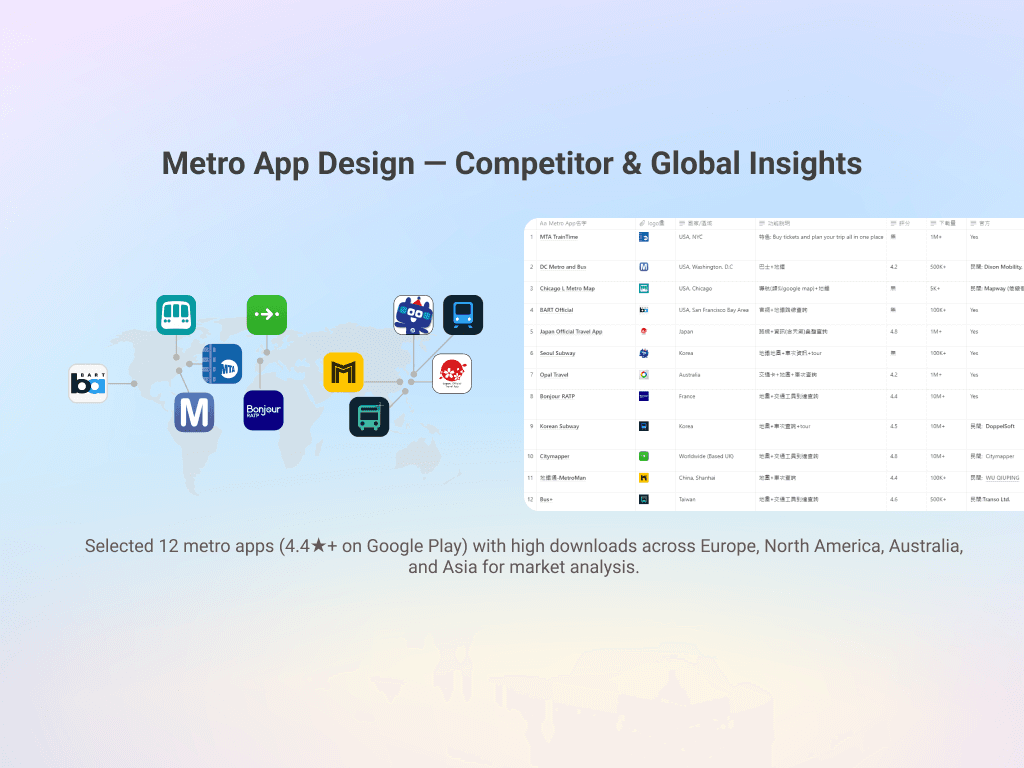
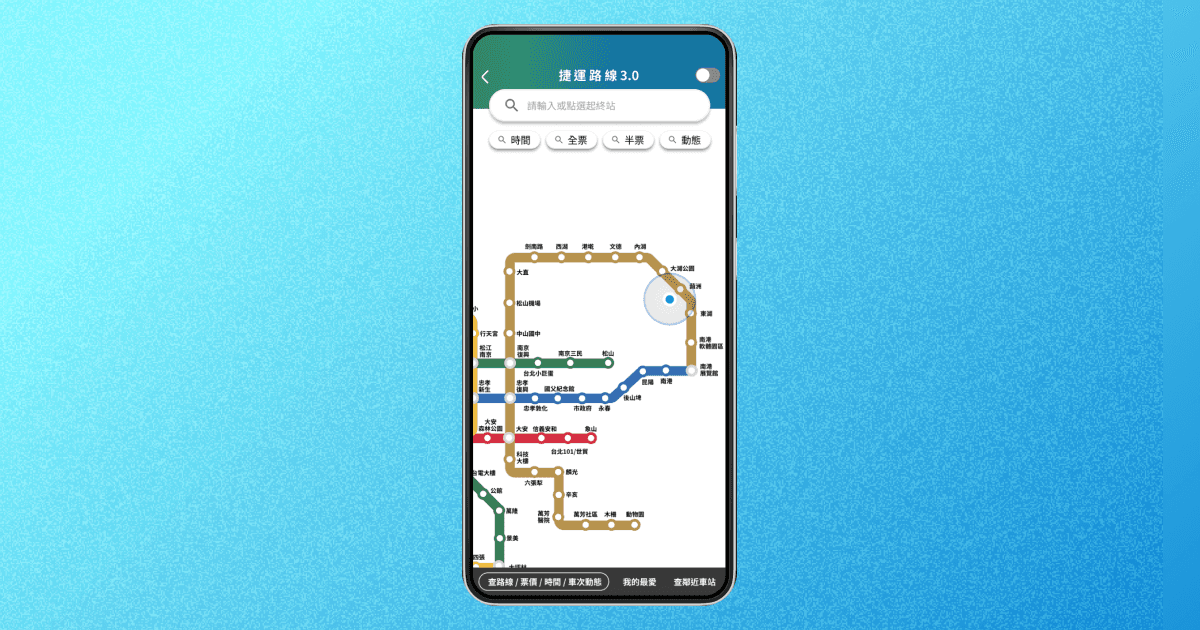
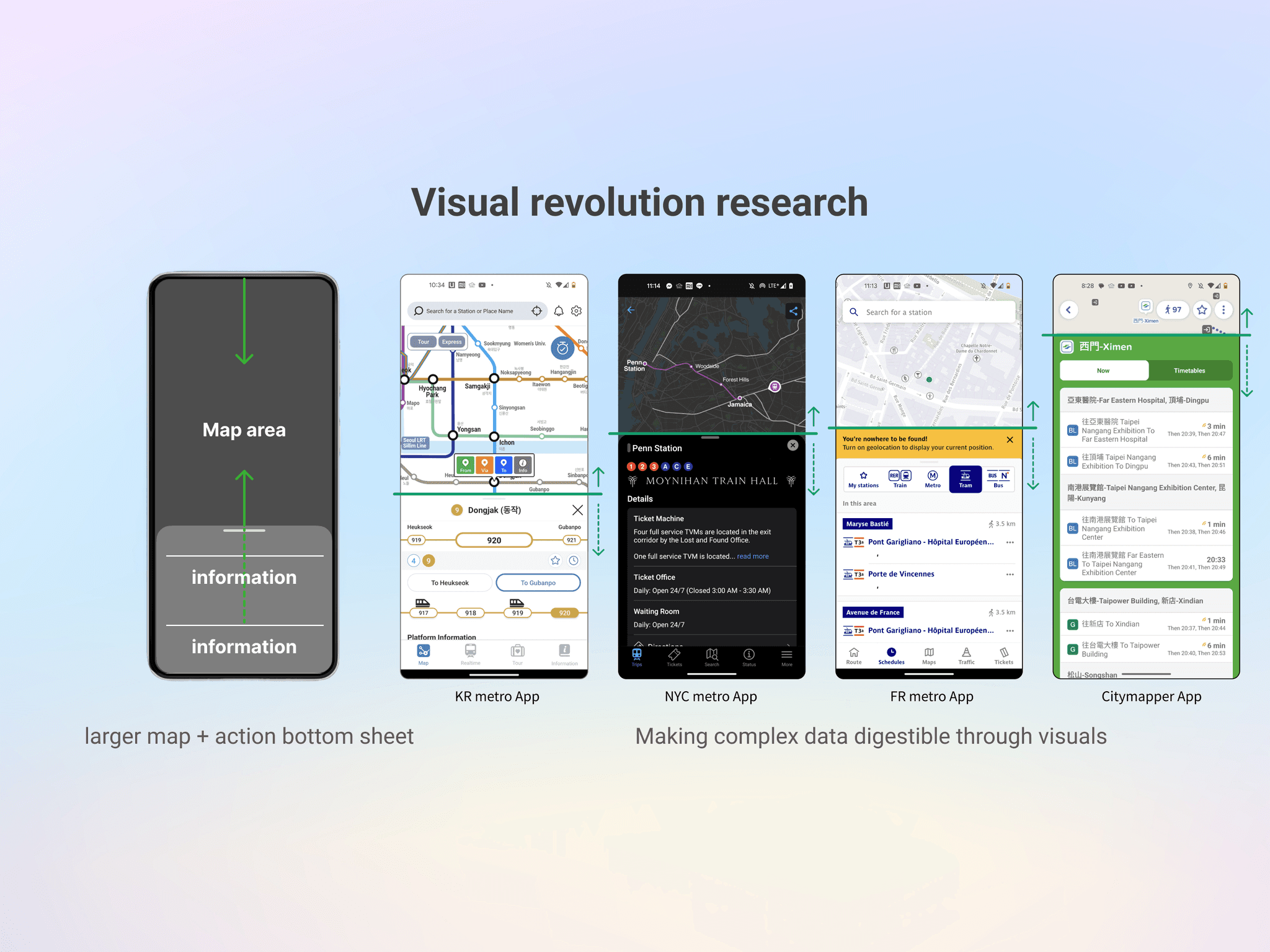
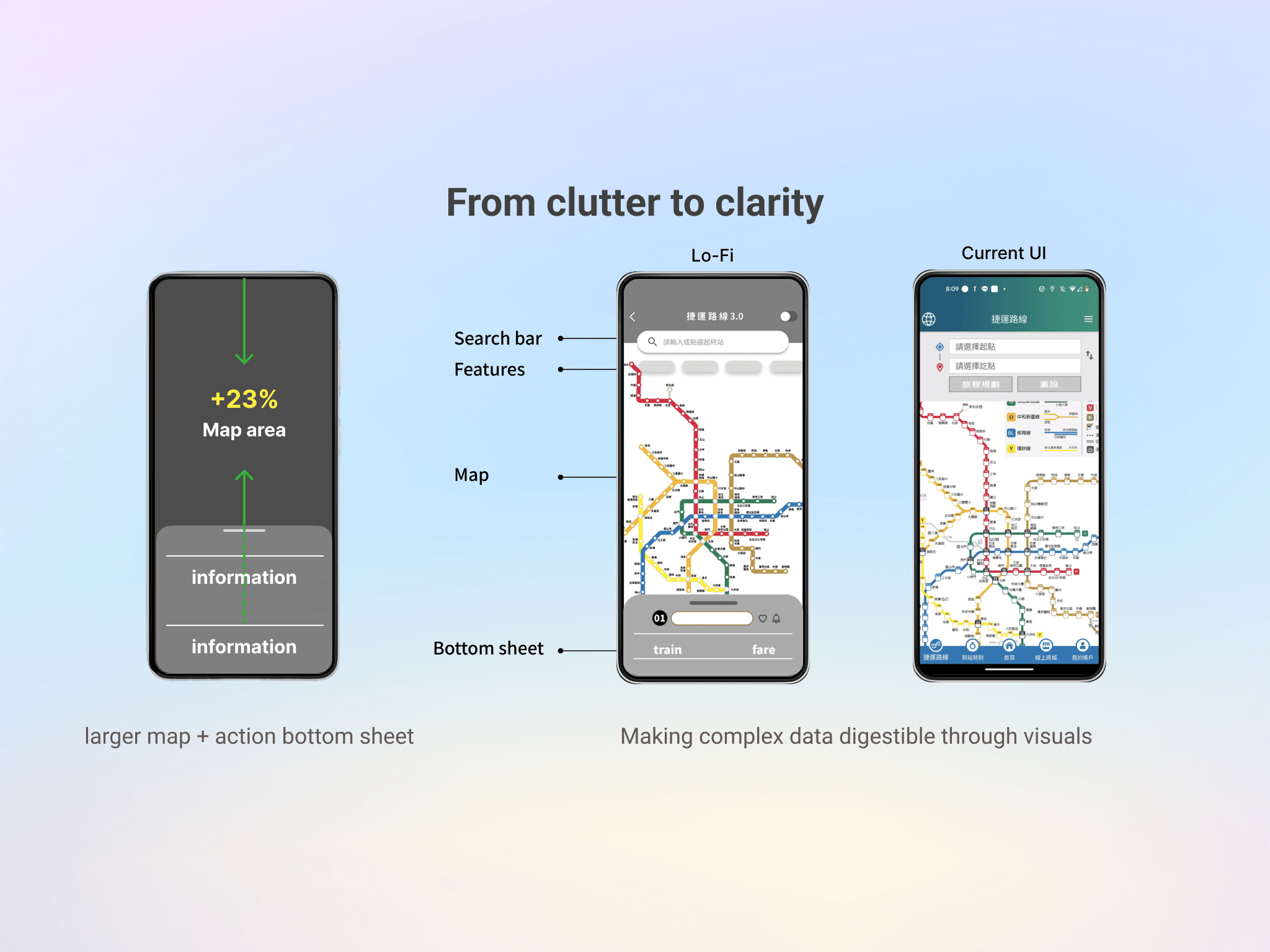
I analyzed top transit apps from Korea, Singapore, the UK, and France. They shared one key element: The Action Bottom Sheet. This expandable bottom panel keeps maps visible while letting you interact with train data in real time. It solved one of mobile’s biggest issues: screen space. No more toggling between “view” and “info”—you get both, always. A 23% Visual Revolution Most visible upgrade? The map. I decided to increase its on-screen area by 23%, a massive improvement on mobile screens. By sharpening route colors, introduced circular stations, and added clear button feedback. Now when you tap a stop, you know it’s interactive.
03 Redefining the Information Architecture / Low-fi UI
03 Redefining the Information Architecture / Low-fi UI
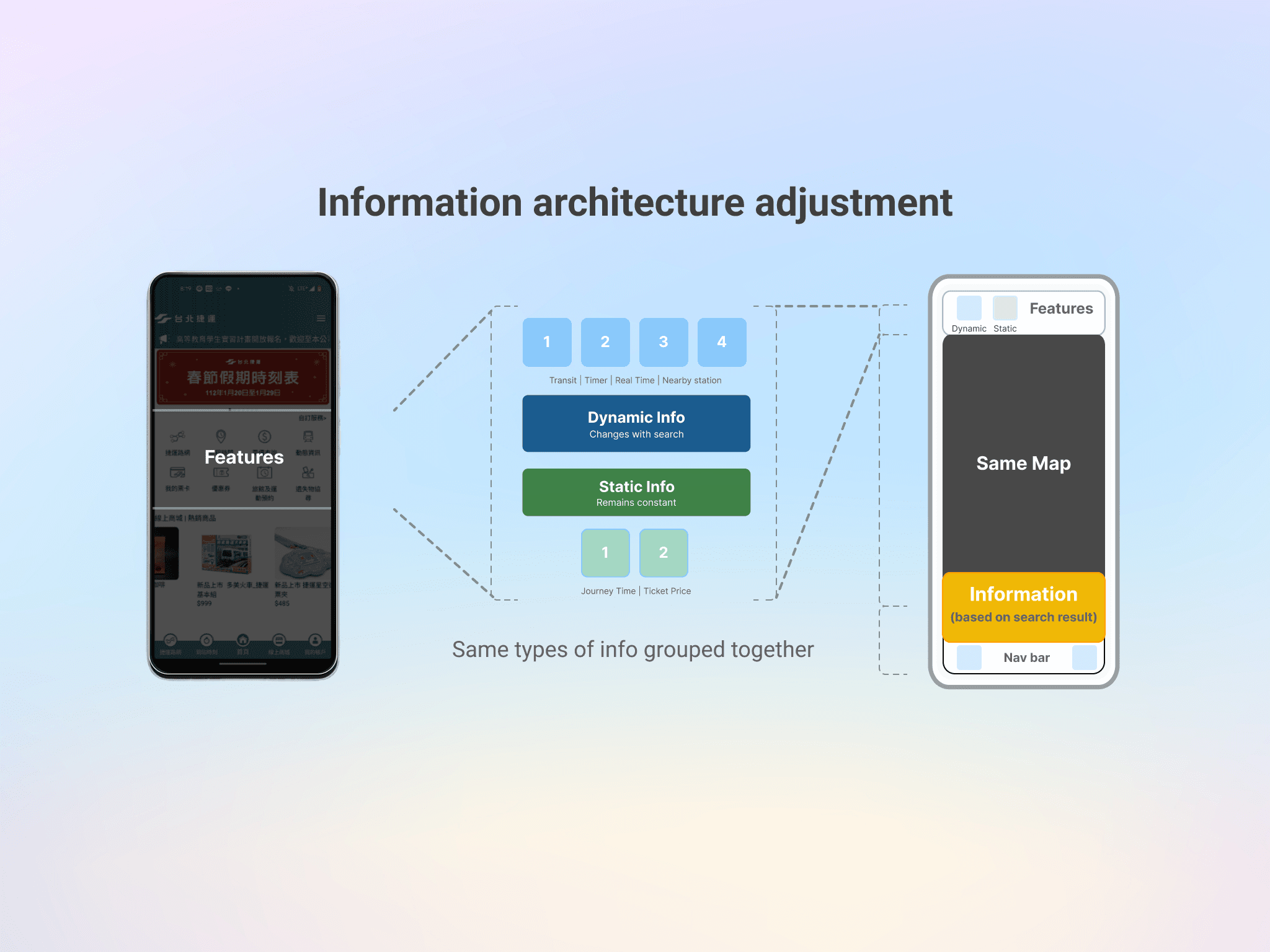
Information Architecture Adjustment The information architecture was restructured to reduce cognitive load while preserving a consistent core interface. The main UI remains stable, with only context-specific sections updating based on route search results. Six core functions were consolidated into three functional groups, allowing static and dynamic information to be accessed within a single, integrated route-planning experience. To support efficient decision-making, users can toggle between static and real-time data without leaving the screen, and contextual features such as exit reminders are directly embedded into route results. The mobile interface is organized into three clear layers—main map area, feature area, and action sheet—ensuring clarity, scalability, and ease of use during time-sensitive commuting scenarios.
04 Usability Testing
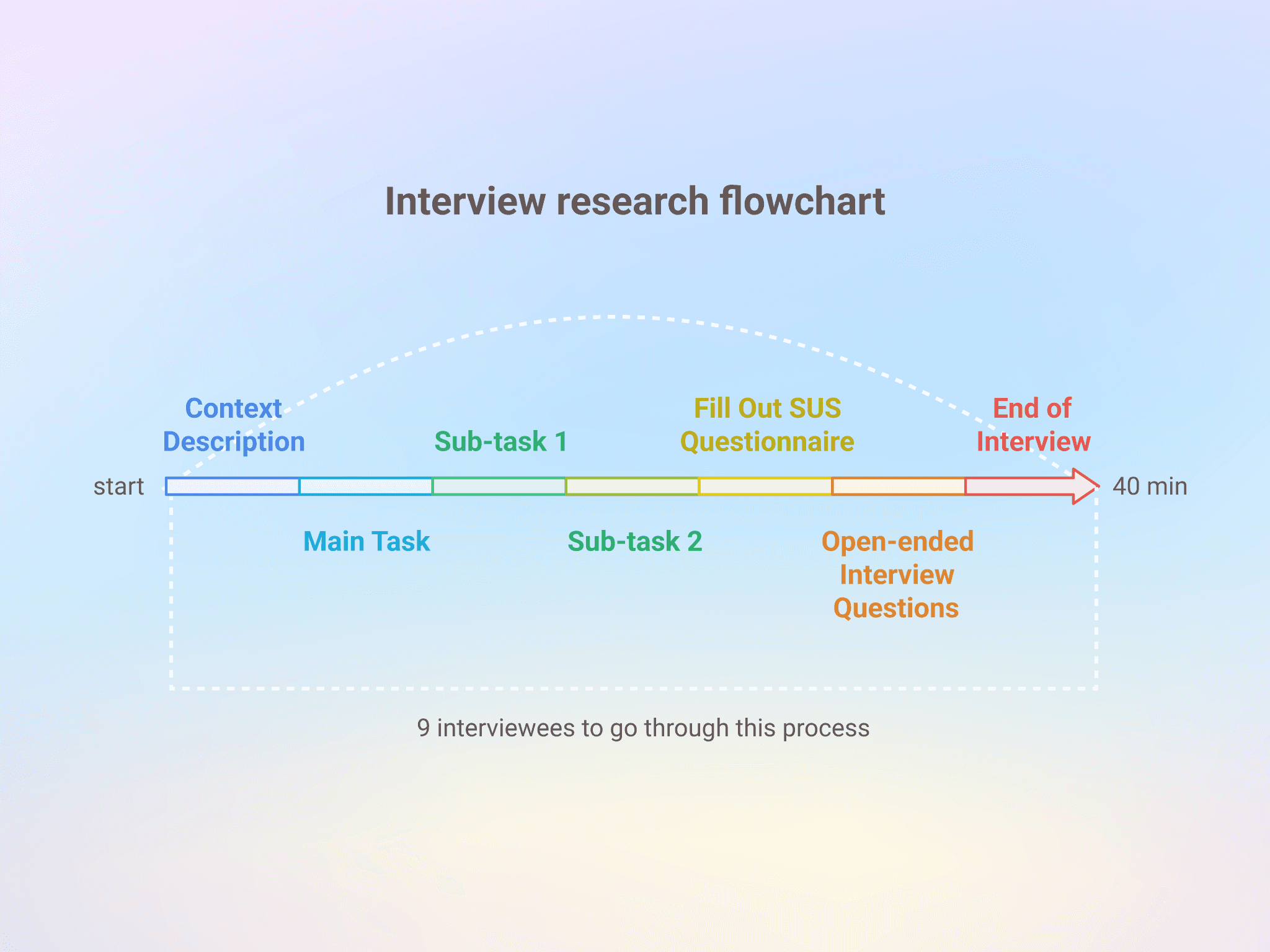
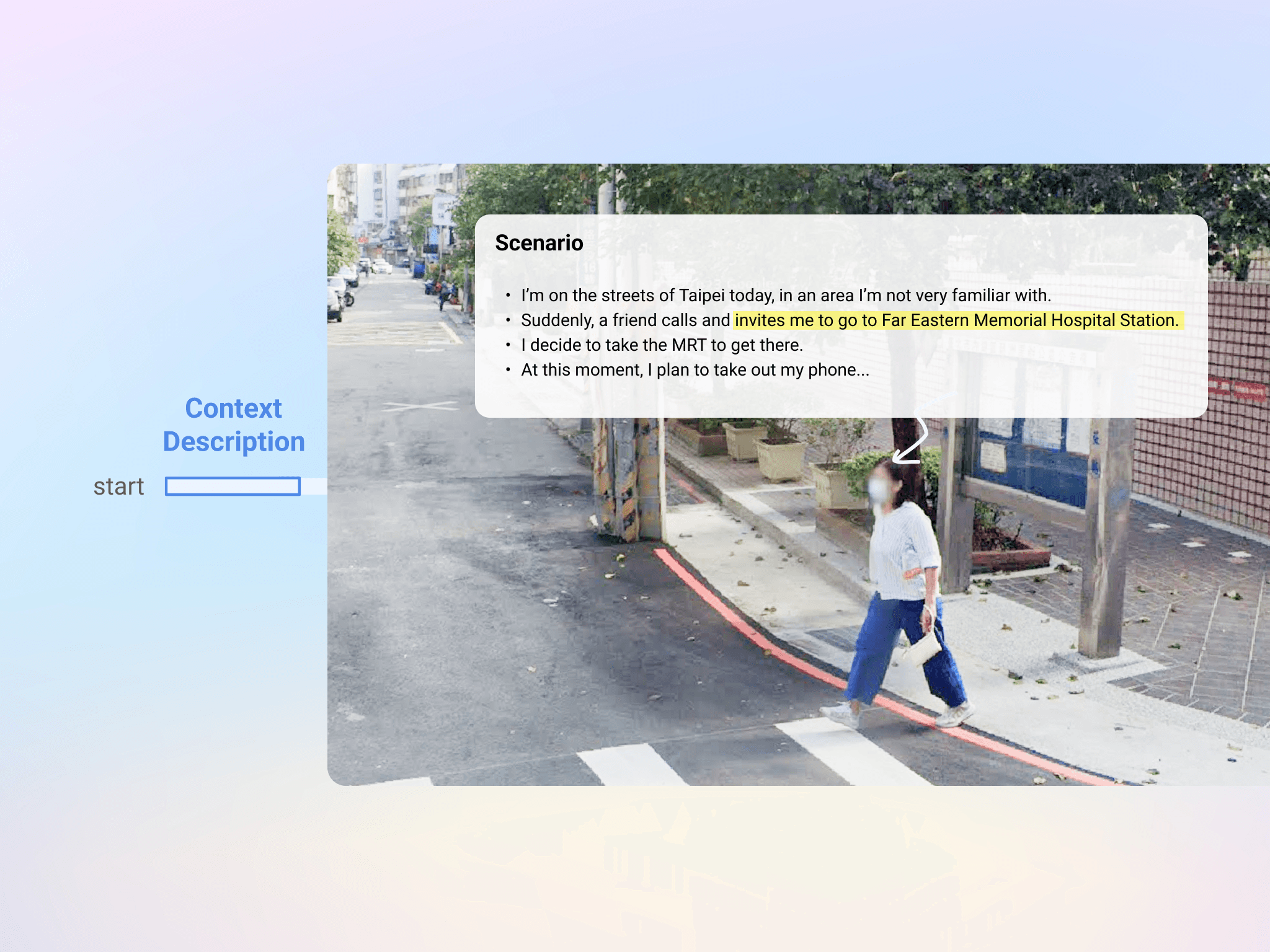
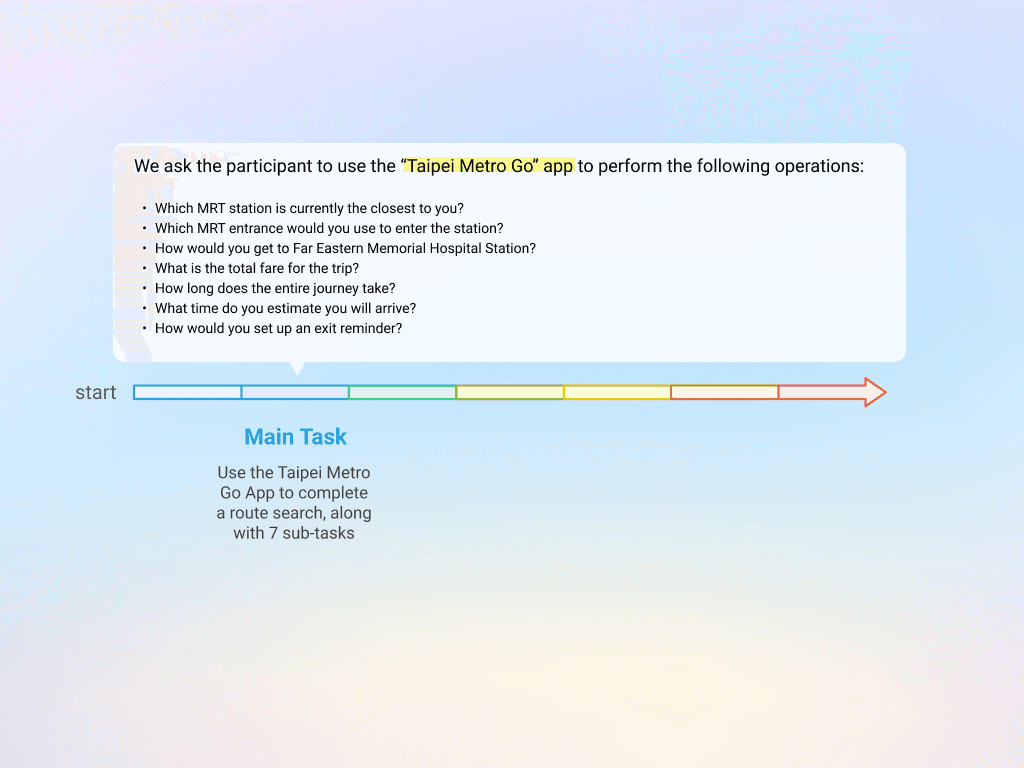
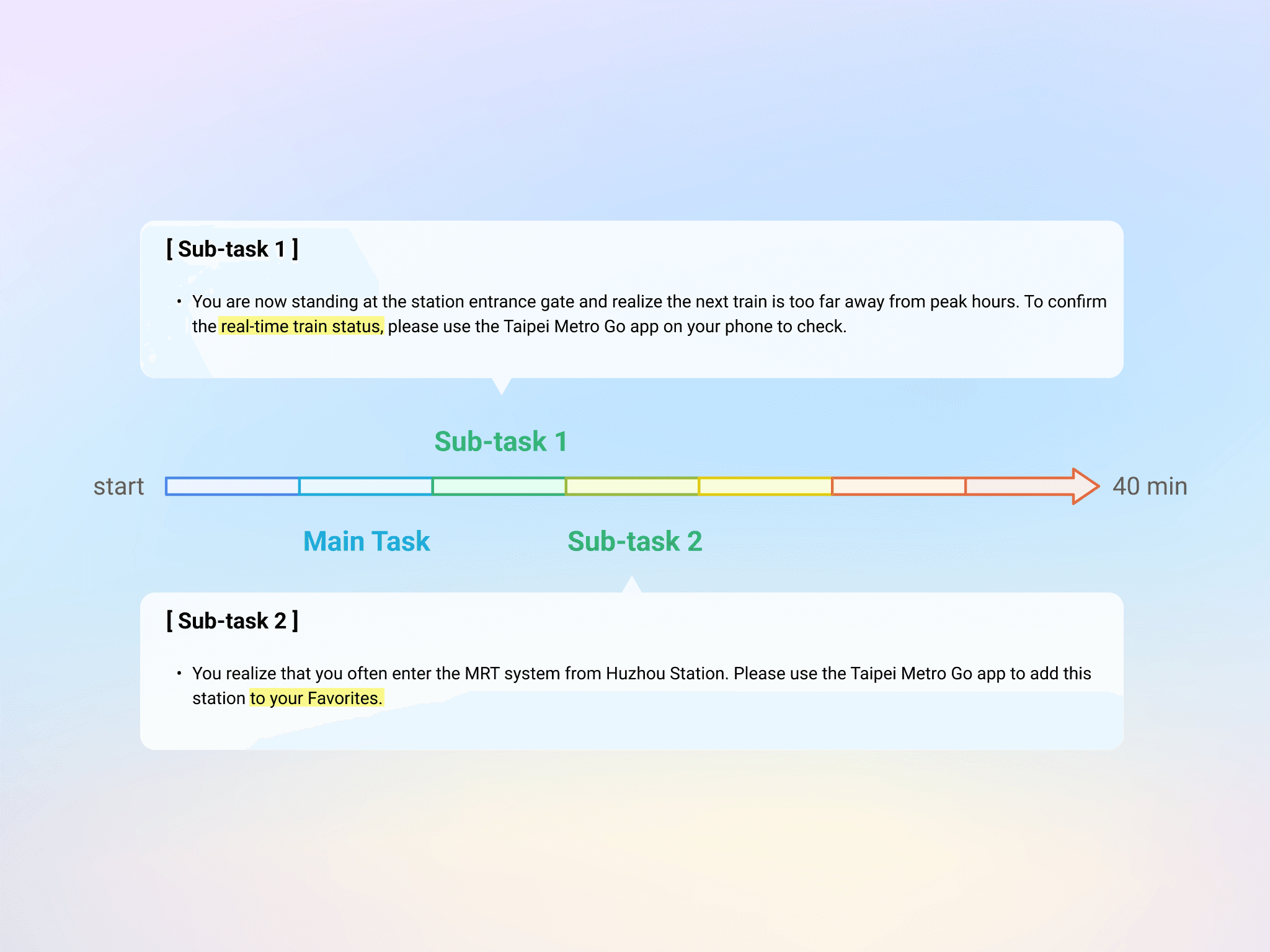
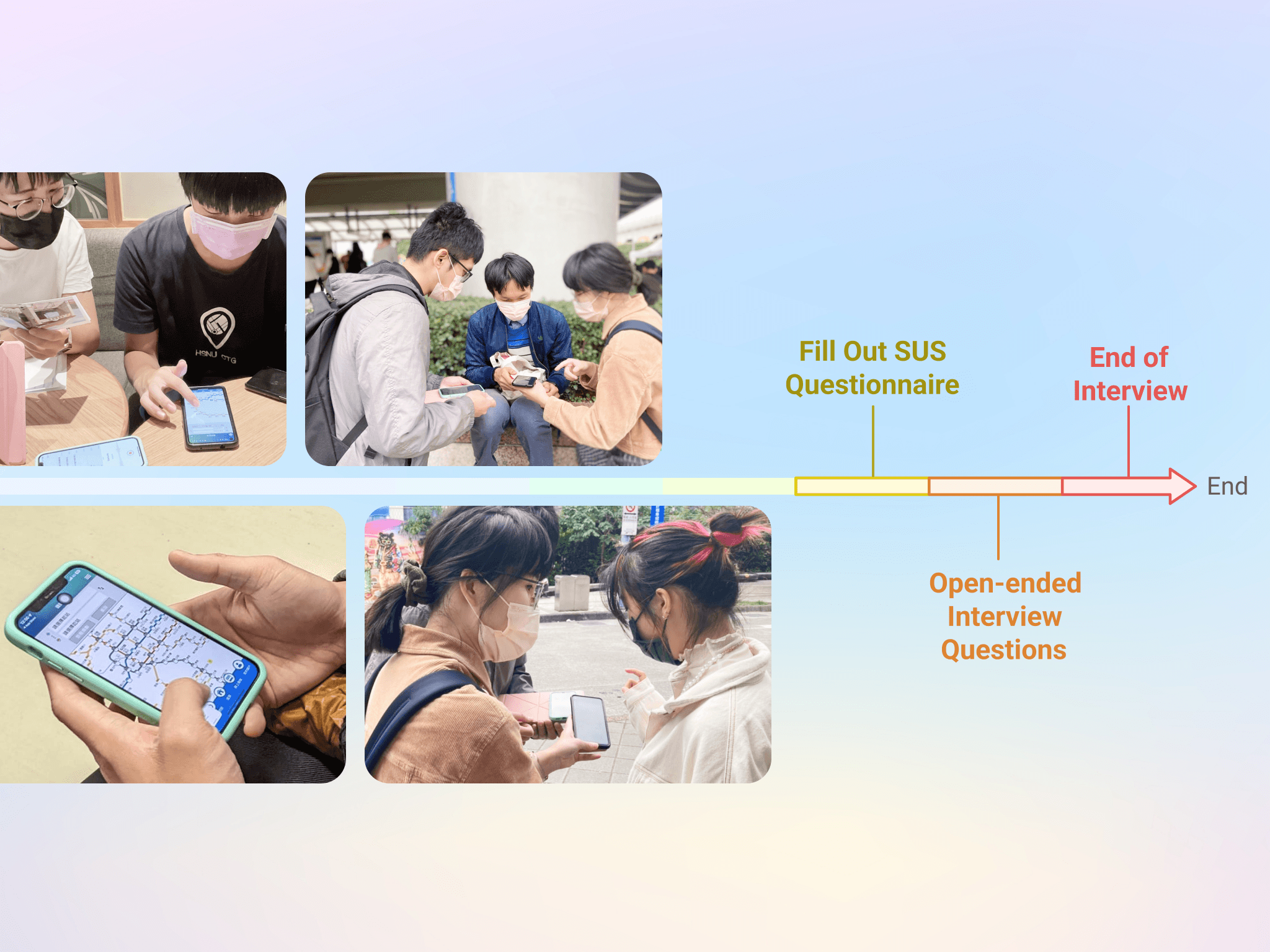
I designed a task for low-fidelity prototype testing. “You’re in an unfamiliar part of Taipei. A friend suddenly asks you to meet at Far Eastern Hospital Station. You grab your phone…” Why this scenario? Because it’s real: spontaneous, location-based, and time-pressured. Each participant first tried the existing app, then our redesigned prototype. Each session lasted ~40 minutes.
That summer, we combined qualitative insights with quantitative data to improve an app — and in turn, that app improved the daily commute for thousands of people. This project reminded us: sometimes, making the world better really does begin with a more usable button.
Field Research in the Real World — 9 People, 9 Ways of Using the Metro I didn’t sit in a room making guesses—we hit the streets. From an MRT online forum, I gathered 41 survey responses and conducted in-depth interviews with 9 participants (aged 19 to 50) from diverse backgrounds. What I discovered were three unique “metro personas”: A. The Planner – Mr. R (31, Web Engineer) Arrives 15 minutes early. Needs to know exactly when the next train is coming to stay on schedule. B. The Sprinter – Mr. Lin (25, Student) Always rushing. Prioritizes real-time updates because every second counts. C. The Budgeter – Ms. Lee (31, Medical Researcher) On a tight budget, she uses the map to explore which station is cheapest to enter—even if it means walking farther.
I designed a task for low-fidelity prototype testing. “You’re in an unfamiliar part of Taipei. A friend suddenly asks you to meet at Far Eastern Hospital Station. You grab your phone…” Why this scenario? Because it’s real: spontaneous, location-based, and time-pressured. Each participant first tried the existing app, then our redesigned prototype. Each session lasted ~40 minutes.
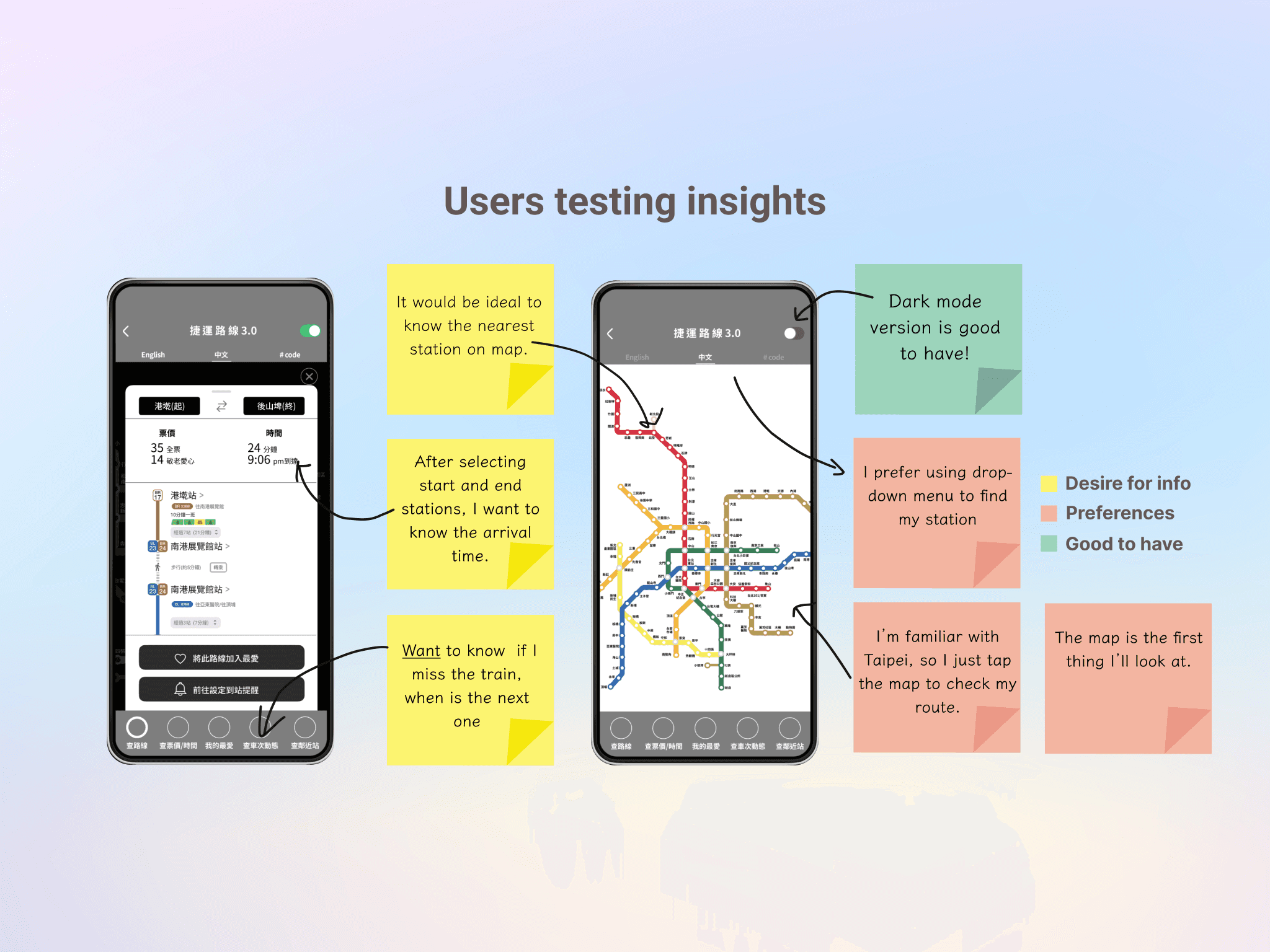
Through interviews, I uncovered a key insight: different users rely on completely different navigation styles. Some are map-first; others use search bars and dropdowns. This insight changed everything. Instead of forcing a single user flow, we designed dual pathways—map tap & text input—so users could navigate their way.
05 Iterating UI Designs
05 Iterating UI Designs
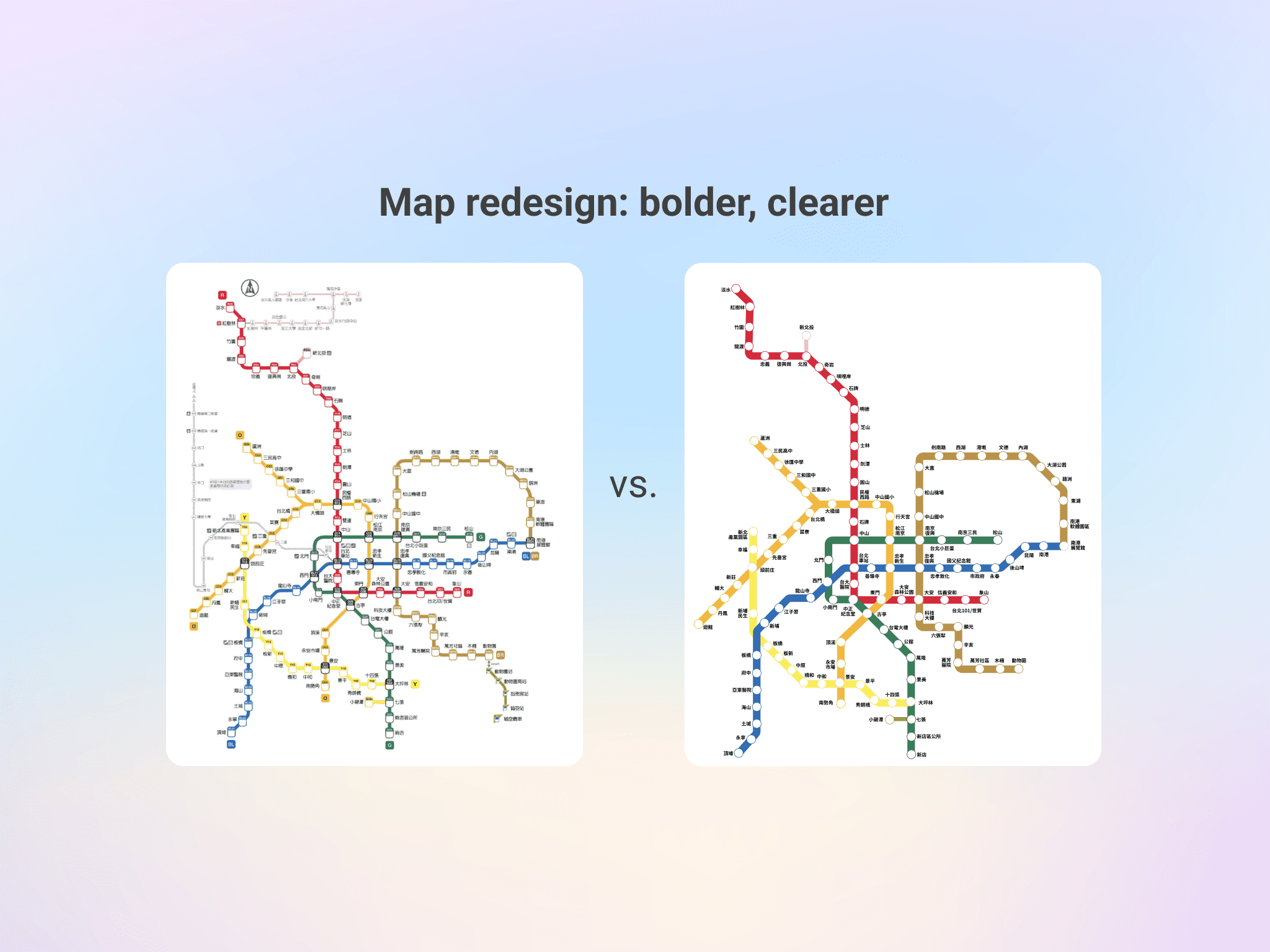
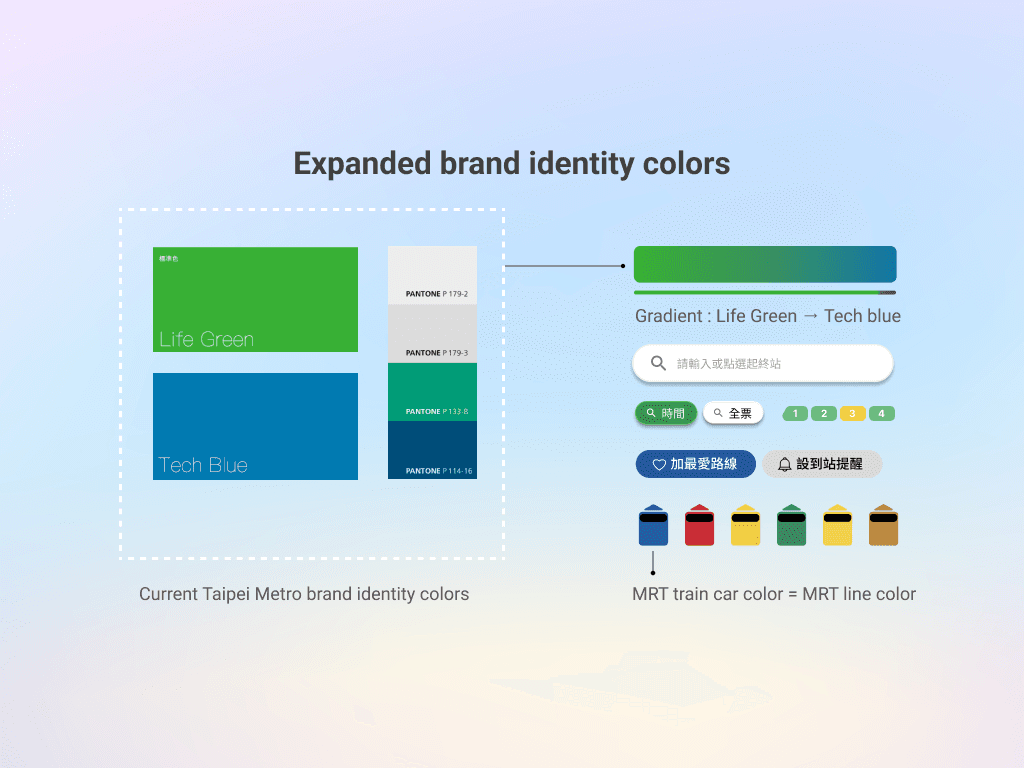
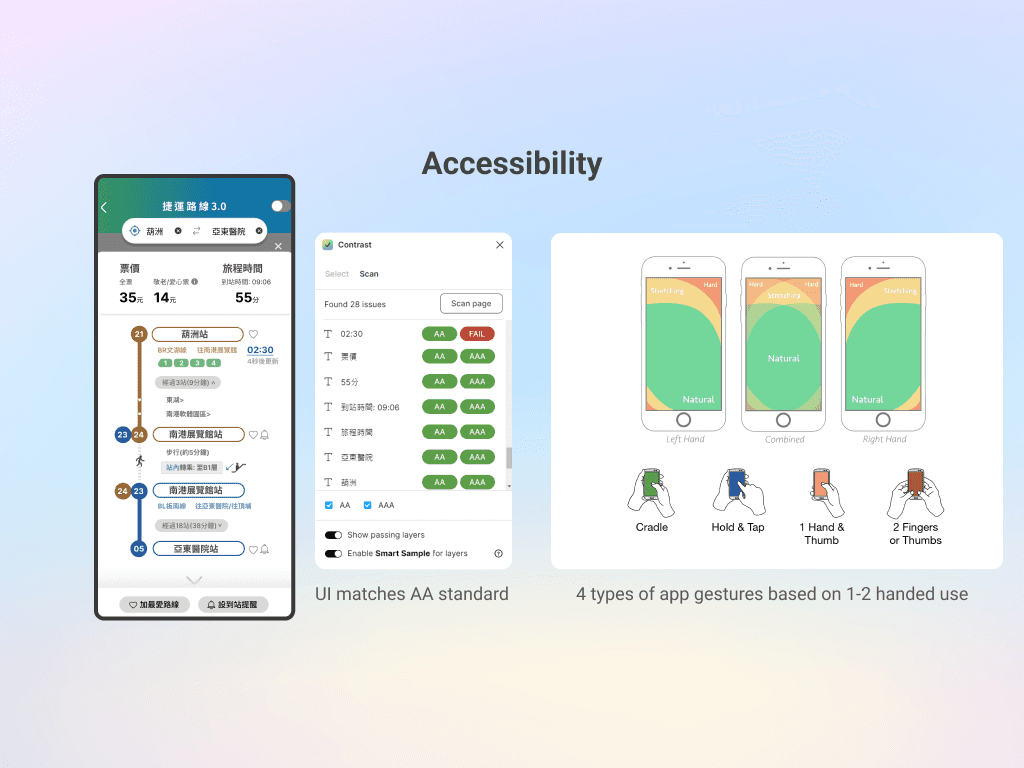
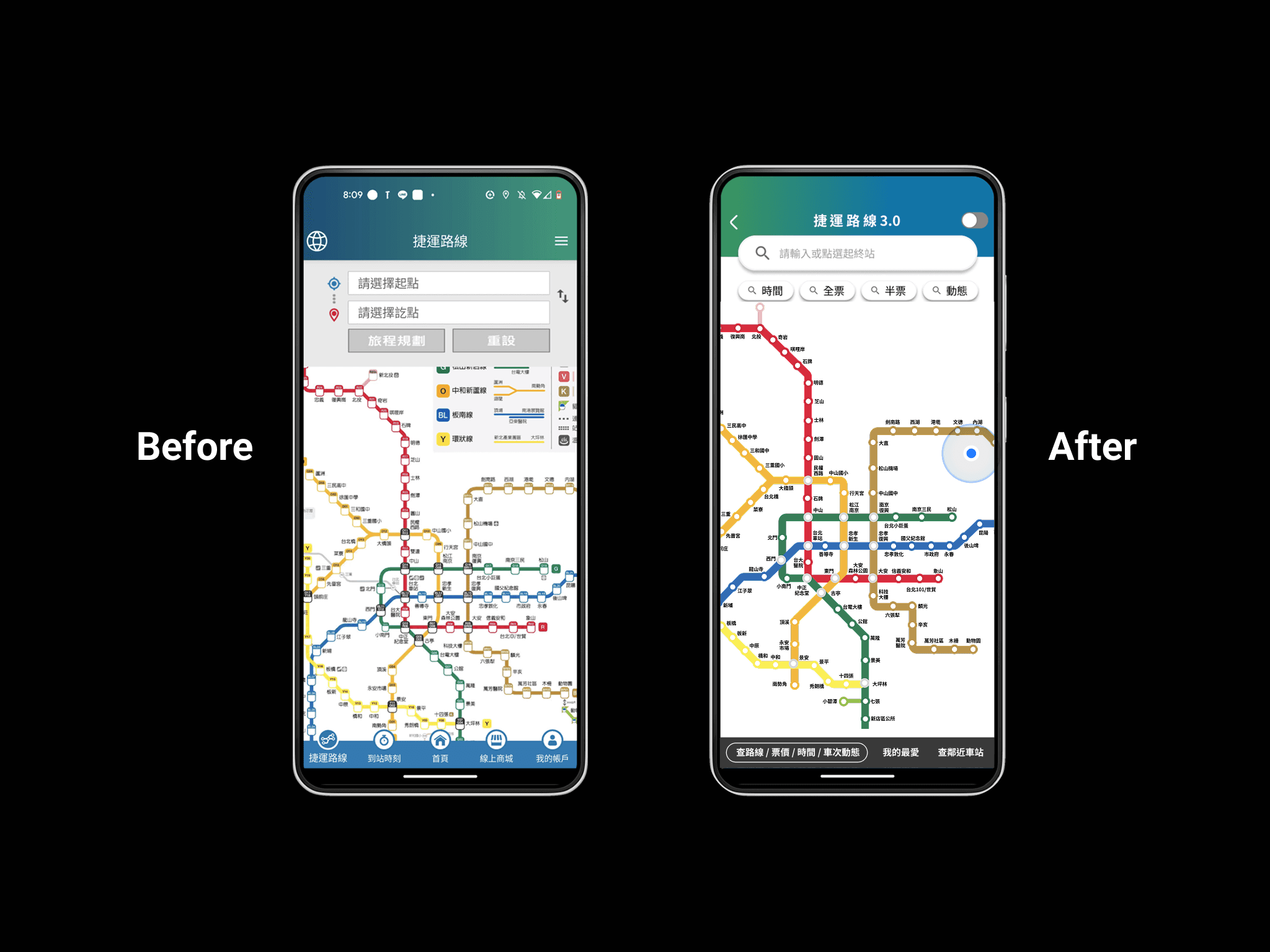
Metro Map UI Redesign: Visual Clarity Enhancement The original map’s thin lines, small station markers, and dense layout make routes hard to follow, especially on mobile, and can cause eye strain at transfer points. The redesign improves clarity with thicker, more distinct lines and larger station markers, making routes easier to track and stations easier to see and tap on mobile devices. Besides Rather than invent a new palette, I built on Taipei Metro’s existing corporate identity (CIS): • Green: Core actions (like main routes) • Blue: Supportive functions • Gray: Foundational info Every choice passed WCAG AA-level contrast checks using Figma’s Contrast plugin—so users can read clearly, even while standing in a swaying train.
06 Accessibility: A Gentle Revolution Designing for Everyone, Not Just “Users with Disabilities” We followed A11y (Accessibility) principles—not to check boxes, but because we believe good design is universal. No color-only indicators—icons and text back up every signal Contrast-compliant visuals One-handed use on shaky trains Inspired by Steven Hoober’s mobile ergonomics research, we positioned primary actions within thumb-friendly zones. This wasn’t theoretical—it was field-tested.
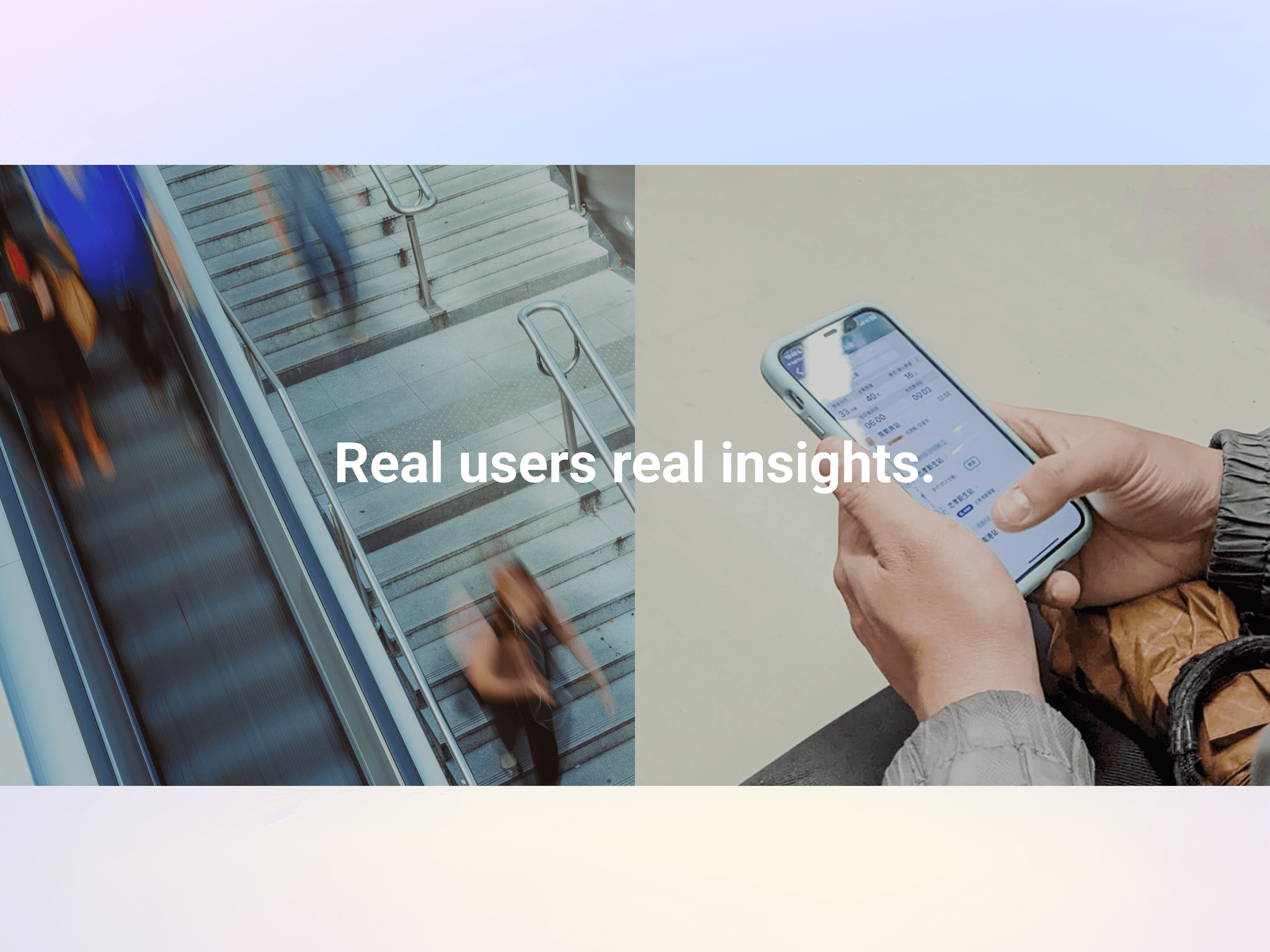
✍️ What I Learned This project taught us one essential truth: Nothing beats real user research. Just 9 people. 40 minutes each. One authentic scenario. That was enough to uncover insights our team could never have guessed from a desk. R’s planning. Lin’s urgency. Lee’s budgeting. These weren’t “personas.” They were real people—and the true foundation of design. We also saw how data gives design its voice. When your decisions are backed by statistical significance, the conversation shifts from opinion to evidence.
02 Uncovering User Pain Points The existing Taipei Metro app had a cluttered structure, redundant navigation paths, and no clear entry point to the map—a feature users accessed most frequently. We also discovered inconsistent UI patterns and confusing language that increased user anxiety during commutes. Through heuristic evaluation and user feedback, we identified that the app needed not just a visual redesign, but a fundamental rethinking of its information hierarchy.
Field Research in the Real World — 9 People, 9 Ways of Using the Metro I didn’t sit in a room making guesses—we hit the streets. From an MRT online forum, I gathered 41 survey responses and conducted in-depth interviews with 9 participants (aged 19 to 50) from diverse backgrounds. What I discovered were three unique “metro personas”: A. The Planner – Mr. R (31, Web Engineer) Arrives 15 minutes early. Needs to know exactly when the next train is coming to stay on schedule. B. The Sprinter – Mr. Lin (25, Student) Always rushing. Prioritizes real-time updates because every second counts. C. The Budgeter – Ms. Lee (31, Medical Researcher) On a tight budget, she uses the map to explore which station is cheapest to enter—even if it means walking farther.
The Taipei Metro Go app was overloaded with advertisements and commercial content on its main portal, while its core route-planning features were fragmented across multiple sub-sections. Essential information—such as ticket pricing, estimated travel time, and real-time updates—were separated into different pages, forcing users to repeatedly return to the main portal to access related functions. The lack of integration between these features created an inefficient and frustrating commuting experience. In early 2023, Taipei Metro initiated a nationwide UI/UX hackathon to redesign the app and improve the commuter experience. I was the only UIUX designer in this project.
The Taipei Metro Go app was overloaded with advertisements and commercial content on its main portal, while its core route-planning features were fragmented across multiple sub-sections. Essential information—such as ticket pricing, estimated travel time, and real-time updates—were separated into different pages, forcing users to repeatedly return to the main portal to access related functions. The lack of integration between these features created an inefficient and frustrating commuting experience. In early 2023, Taipei Metro initiated a nationwide UI/UX hackathon to redesign the app and improve the commuter experience. I was the only UIUX designer in this project.
Comparing the old and new versions: • Satisfaction: +22.54% • Task success rate: +35% • Map area: +23% • Statistical analysis confirmed it: t(7) = -4.212, p = .004 — this was no coincidence.
I analyzed top transit apps from Korea, Singapore, the UK, and France. They shared one key element: The Action Bottom Sheet. This expandable bottom panel keeps maps visible while letting you interact with train data in real time. It solved one of mobile’s biggest issues: screen space. No more toggling between “view” and “info”—you get both, always. A 23% Visual Revolution Most visible upgrade? The map. I decided to increase its on-screen area by 23%, a massive improvement on mobile screens. By sharpening route colors, introduced circular stations, and added clear button feedback. Now when you tap a stop, you know it’s interactive.
Information Architecture Adjustment The information architecture was restructured to reduce cognitive load while preserving a consistent core interface. The main UI remains stable, with only context-specific sections updating based on route search results. Six core functions were consolidated into three functional groups, allowing static and dynamic information to be accessed within a single, integrated route-planning experience. To support efficient decision-making, users can toggle between static and real-time data without leaving the screen, and contextual features such as exit reminders are directly embedded into route results. The mobile interface is organized into three clear layers—main map area, feature area, and action sheet—ensuring clarity, scalability, and ease of use during time-sensitive commuting scenarios.
Metro Map UI Redesign: Visual Clarity Enhancement The original map’s thin lines, small station markers, and dense layout make routes hard to follow, especially on mobile, and can cause eye strain at transfer points. The redesign improves clarity with thicker, more distinct lines and larger station markers, making routes easier to track and stations easier to see and tap on mobile devices. Besides Rather than invent a new palette, I built on Taipei Metro’s existing corporate identity (CIS): • Green: Core actions (like main routes) • Blue: Supportive functions • Gray: Foundational info Every choice passed WCAG AA-level contrast checks using Figma’s Contrast plugin—so users can read clearly, even while standing in a swaying train.
Field Research in the Real World — 9 People, 9 Ways of Using the Metro I didn’t sit in a room making guesses—we hit the streets. From an MRT online forum, I gathered 41 survey responses and conducted in-depth interviews with 9 participants (aged 19 to 50) from diverse backgrounds. What I discovered were three unique “metro personas”: A. The Planner – Mr. R (31, Web Engineer) Arrives 15 minutes early. Needs to know exactly when the next train is coming to stay on schedule. B. The Sprinter – Mr. Lin (25, Student) Always rushing. Prioritizes real-time updates because every second counts. C. The Budgeter – Ms. Lee (31, Medical Researcher) On a tight budget, she uses the map to explore which station is cheapest to enter—even if it means walking farther.
I designed a task for low-fidelity prototype testing. “You’re in an unfamiliar part of Taipei. A friend suddenly asks you to meet at Far Eastern Hospital Station. You grab your phone…” Why this scenario? Because it’s real: spontaneous, location-based, and time-pressured. Each participant first tried the existing app, then our redesigned prototype. Each session lasted ~40 minutes.
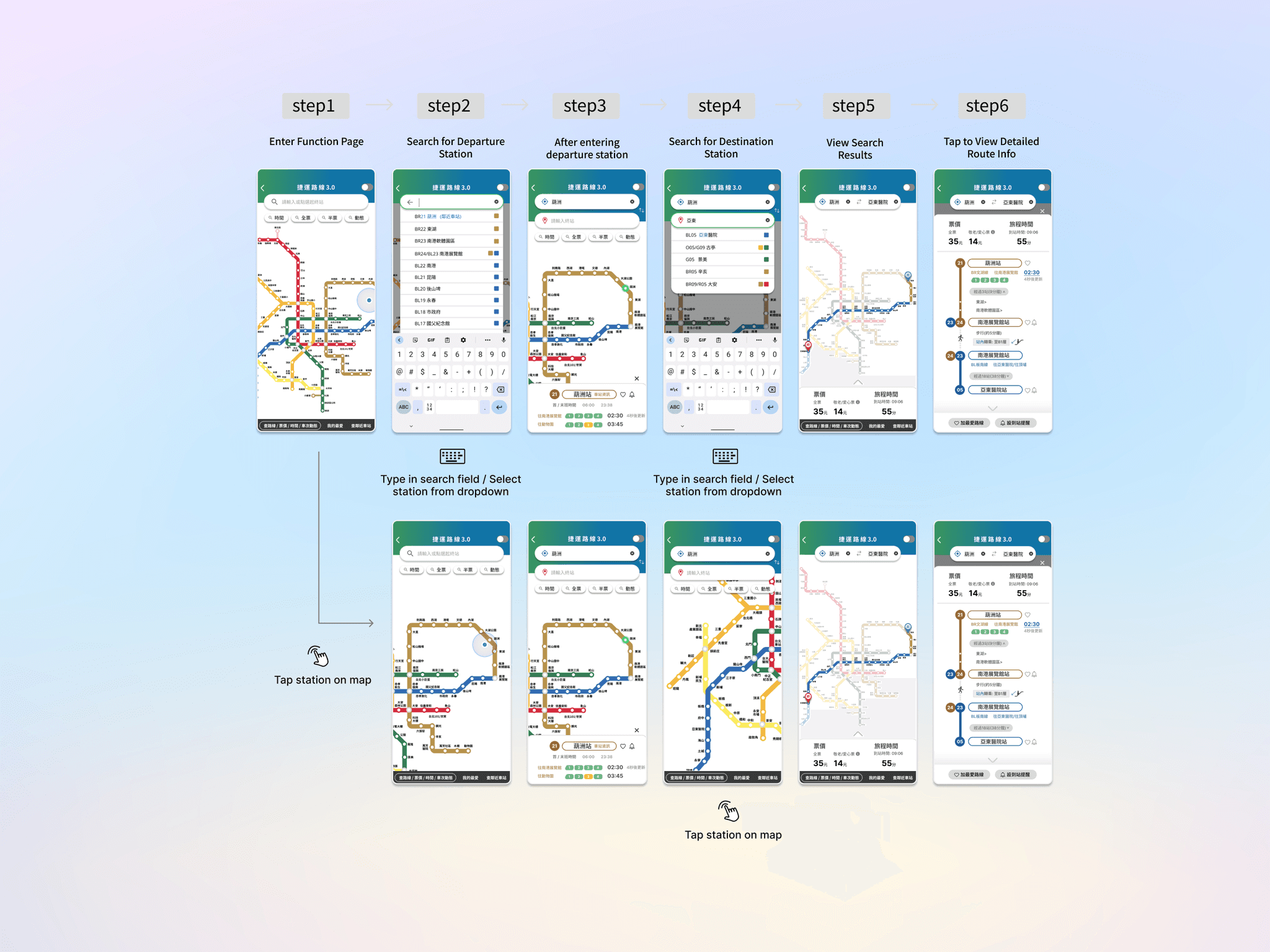
Through interviews, I uncovered a key insight: different users rely on completely different navigation styles. Some are map-first; others use search bars and dropdowns. This insight changed everything. Instead of forcing a single user flow, we designed dual pathways—map tap & text input—so users could navigate their way.
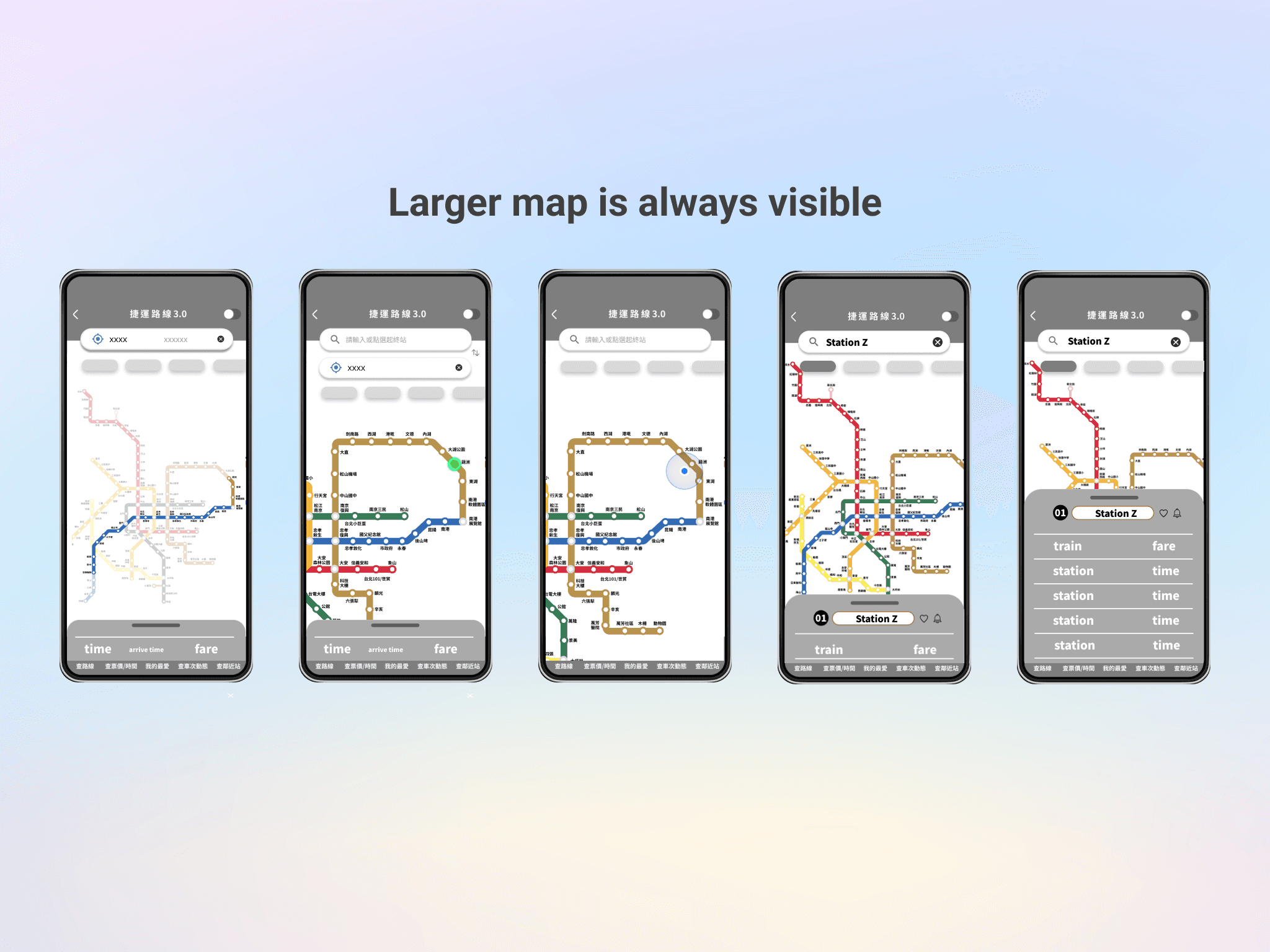
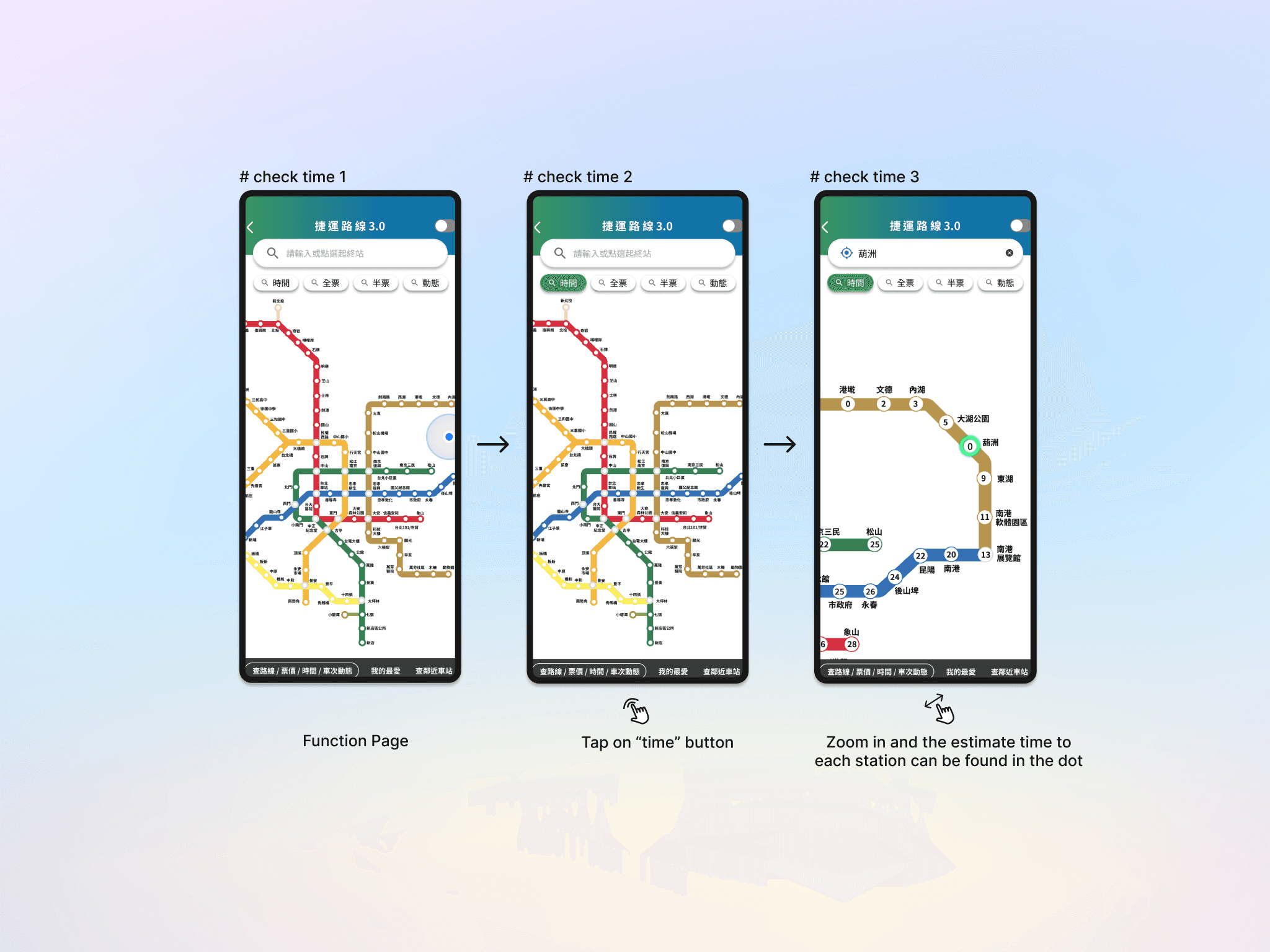
In the final design, I supported both. Users can tap directly on the map or type into the search bar, and a dropdown list to select stations. Once they have finished choosing a start and end point, the system immediately displays the route, estimated time, and transfer details in the bottom sheet, all without leaving the main map view. This flexibility enabled people with diverse habits to feel at ease using the app. Additionally, users can filter by time and ticket fee via the button below the search bar, and zoom in to see the estimated time or price inside the station dot.
Through interviews, I uncovered a key insight: different users rely on completely different navigation styles. Some are map-first; others use search bars and dropdowns. This insight changed everything. Instead of forcing a single user flow, we designed dual pathways—map tap & text input—so users could navigate their way.
Through interviews, I uncovered a key insight: different users rely on completely different navigation styles. Some are map-first; others use search bars and dropdowns. This insight changed everything. Instead of forcing a single user flow, we designed dual pathways—map tap & text input—so users could navigate their way.
I analyzed top transit apps from Korea, Singapore, the UK, and France. They shared one key element: The Action Bottom Sheet. This expandable bottom panel keeps maps visible while letting you interact with train data in real time. It solved one of mobile’s biggest issues: screen space. No more toggling between “view” and “info”—you get both, always. A 23% Visual Revolution Most visible upgrade? The map. I decided to increase its on-screen area by 23%, a massive improvement on mobile screens. By sharpening route colors, introduced circular stations, and added clear button feedback. Now when you tap a stop, you know it’s interactive.
In the final design, I supported both. Users can tap directly on the map or type into the search bar, and a dropdown list to select stations. Once they have finished choosing a start and end point, the system immediately displays the route, estimated time, and transfer details in the bottom sheet, all without leaving the main map view. This flexibility enabled people with diverse habits to feel at ease using the app. Additionally, users can filter by time and ticket fee via the button below the search bar, and zoom in to see the estimated time or price inside the station dot.
One better button could make a commuter less anxious, or help a tourist feel more confident in a foreign city.
✍️ What I Learned This project taught us one essential truth: Nothing beats real user research. Just 9 people. 40 minutes each. One authentic scenario. That was enough to uncover insights our team could never have guessed from a desk. R’s planning. Lin’s urgency. Lee’s budgeting. These weren’t “personas.” They were real people—and the true foundation of design. We also saw how data gives design its voice. When your decisions are backed by statistical significance, the conversation shifts from opinion to evidence.
Comparing the old and new versions: • Satisfaction: +22.54% • Task success rate: +35% • Map area: +23% • Statistical analysis confirmed it: t(7) = -4.212, p = .004 — this was no coincidence.
Comparing the old and new versions: • Satisfaction: +22.54% • Task success rate: +35% • Map area: +23% • Statistical analysis confirmed it: t(7) = -4.212, p = .004 — this was no coincidence.
That summer, we combined qualitative insights with quantitative data to improve an app — and in turn, that app improved the daily commute for thousands of people. This project reminded us: sometimes, making the world better really does begin with a more usable button.
That summer, we combined qualitative insights with quantitative data to improve an app — and in turn, that app improved the daily commute for thousands of people. This project reminded us: sometimes, making the world better really does begin with a more usable button.
Information Architecture Adjustment The information architecture was restructured to reduce cognitive load while preserving a consistent core interface. The main UI remains stable, with only context-specific sections updating based on route search results. Six core functions were consolidated into three functional groups, allowing static and dynamic information to be accessed within a single, integrated route-planning experience. To support efficient decision-making, users can toggle between static and real-time data without leaving the screen, and contextual features such as exit reminders are directly embedded into route results. The mobile interface is organized into three clear layers—main map area, feature area, and action sheet—ensuring clarity, scalability, and ease of use during time-sensitive commuting scenarios.
Metro Map UI Redesign: Visual Clarity Enhancement The original map’s thin lines, small station markers, and dense layout make routes hard to follow, especially on mobile, and can cause eye strain at transfer points. The redesign improves clarity with thicker, more distinct lines and larger station markers, making routes easier to track and stations easier to see and tap on mobile devices. Besides Rather than invent a new palette, I built on Taipei Metro’s existing corporate identity (CIS): • Green: Core actions (like main routes) • Blue: Supportive functions • Gray: Foundational info Every choice passed WCAG AA-level contrast checks using Figma’s Contrast plugin—so users can read clearly, even while standing in a swaying train.
Through interviews, I uncovered a key insight: different users rely on completely different navigation styles. Some are map-first; others use search bars and dropdowns. This insight changed everything. Instead of forcing a single user flow, we designed dual pathways—map tap & text input—so users could navigate their way.
Field Research in the Real World — 9 People, 9 Ways of Using the Metro I didn’t sit in a room making guesses—we hit the streets. From an MRT online forum, I gathered 41 survey responses and conducted in-depth interviews with 9 participants (aged 19 to 50) from diverse backgrounds. What I discovered were three unique “metro personas”: A. The Planner – Mr. R (31, Web Engineer) Arrives 15 minutes early. Needs to know exactly when the next train is coming to stay on schedule. B. The Sprinter – Mr. Lin (25, Student) Always rushing. Prioritizes real-time updates because every second counts. C. The Budgeter – Ms. Lee (31, Medical Researcher) On a tight budget, she uses the map to explore which station is cheapest to enter—even if it means walking farther.
Information Architecture Adjustment The information architecture was restructured to reduce cognitive load while preserving a consistent core interface. The main UI remains stable, with only context-specific sections updating based on route search results. Six core functions were consolidated into three functional groups, allowing static and dynamic information to be accessed within a single, integrated route-planning experience. To support efficient decision-making, users can toggle between static and real-time data without leaving the screen, and contextual features such as exit reminders are directly embedded into route results. The mobile interface is organized into three clear layers—main map area, feature area, and action sheet—ensuring clarity, scalability, and ease of use during time-sensitive commuting scenarios.
06 From Prototype to Public Impact
06 From Prototype to Public Impact
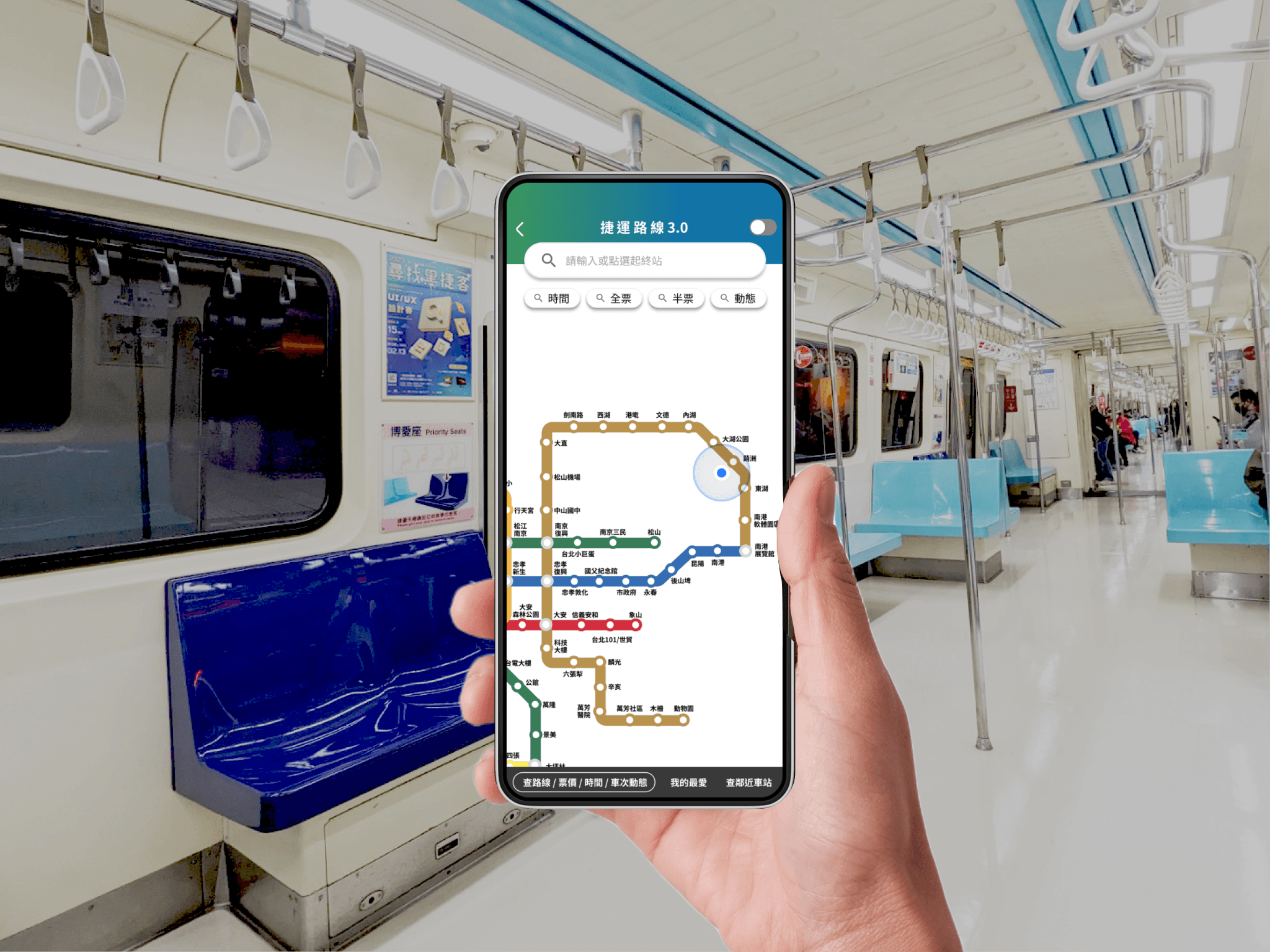
In the final design, I supported both. Users can tap directly on the map or type into the search bar, and a dropdown list to select stations. Once they have finished choosing a start and end point, the system immediately displays the route, estimated time, and transfer details in the bottom sheet, all without leaving the main map view. This flexibility enabled people with diverse habits to feel at ease using the app. Additionally, users can filter by time and ticket fee via the button below the search bar, and zoom in to see the estimated time or price inside the station dot.
✍️ What I Learned This project taught us one essential truth: Nothing beats real user research. Just 9 people. 40 minutes each. One authentic scenario. That was enough to uncover insights our team could never have guessed from a desk. R’s planning. Lin’s urgency. Lee’s budgeting. These weren’t “personas.” They were real people—and the true foundation of design. We also saw how data gives design its voice. When your decisions are backed by statistical significance, the conversation shifts from opinion to evidence.
One better button could make a commuter less anxious, or help a tourist feel more confident in a foreign city.
✍️ What I Learned This project taught us one essential truth: Nothing beats real user research. Just 9 people. 40 minutes each. One authentic scenario. That was enough to uncover insights our team could never have guessed from a desk. R’s planning. Lin’s urgency. Lee’s budgeting. These weren’t “personas.” They were real people—and the true foundation of design. We also saw how data gives design its voice. When your decisions are backed by statistical significance, the conversation shifts from opinion to evidence.

That summer, we combined qualitative insights with quantitative data to improve an app — and in turn, that app improved the daily commute for thousands of people. This project reminded us: sometimes, making the world better really does begin with a more usable button.
Copyright © 2026 Linda-in-design. All rights reserved.